


Actualización de pantalla del Porsche 718 Cayman: Conserva el deportivo, moderniza el habitáculo
A Actualización de pantalla para Porsche 718 Cayman tiene más sentido cuando el coche en sí sigue sintiéndose exactamente bien, pero su PCM ya no encaja con la forma en que navegas, reproduces música, haces llamadas o usas tu teléfono hoy.
La verdadera decisión no es simplemente si una pantalla de 12.3 pulgadas se ve mejor. Es si solo necesitas CarPlay, si quieres Android Auto y aplicaciones Android independientes, o si quieres que la cabina visible se sienta sustancialmente más nueva sin reemplazar el deportivo que compraste por su carácter de conducción.
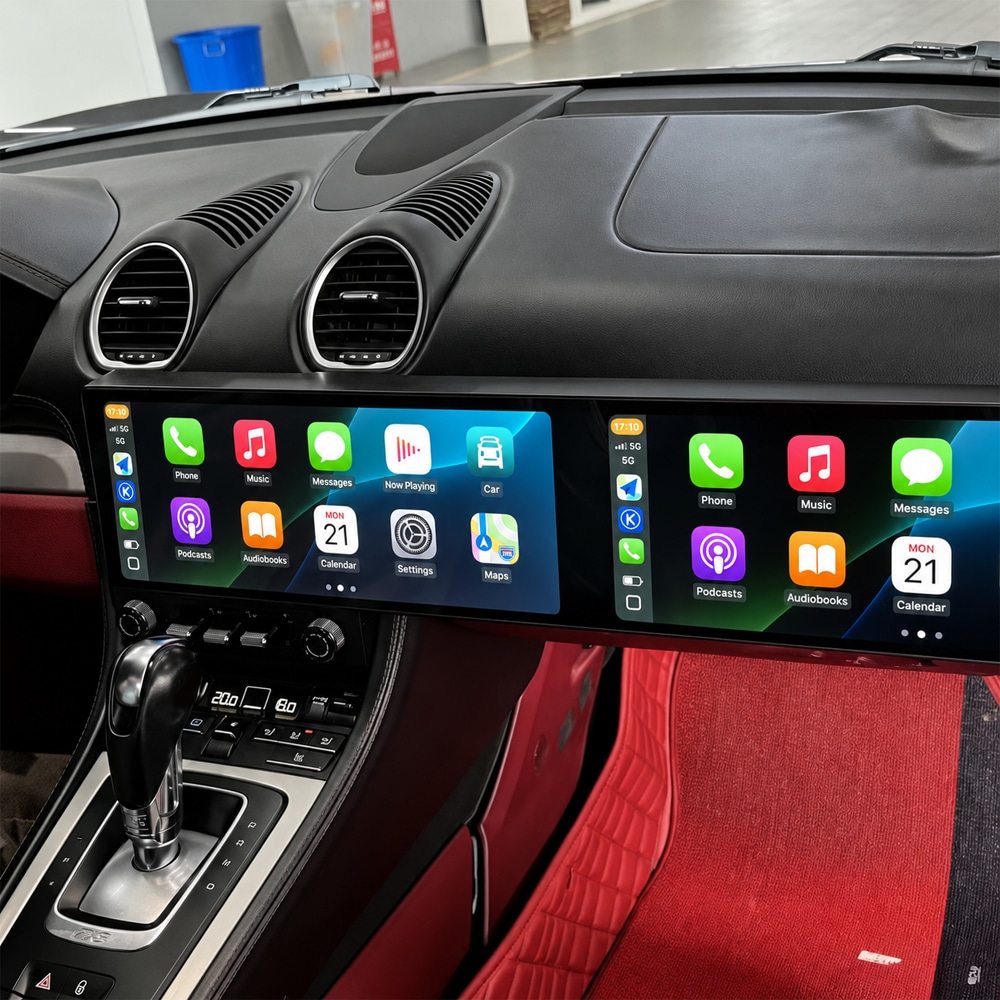
Actualización de pantalla para Porsche 718 Cayman: ¿Por qué comprarla si el coche sigue sintiéndose genial?
Ese es el argumento más sólido para esta actualización. No intentas convertir un Porsche más antiguo en un coche diferente. Estás eliminando una de las mayores brechas tecnológicas entre el 718 que disfrutas conduciendo y el ecosistema de teléfono que ahora usas cada día.
Para un propietario de 718 compatible, el resultado es práctico antes que técnico: entra, conéctate de forma inalámbrica, abre el mapa que ya usas, continúa tu música o pódcast, haz llamadas a través del coche y ve la información en un entorno de pantalla sustancialmente más grande.
Actualización de pantalla para Porsche 718 Cayman: Seis situaciones en las que los propietarios notan la diferencia
Si cada trayecto empieza con Google Maps, Waze, Spotify, Apple Music o llamadas, CarPlay inalámbrico o Android Auto traslada esas rutinas a una pantalla integrada más grande.
Android Auto más la plataforma Android independiente ofrece a los propietarios de teléfonos Android una vía mucho más directa a mapas, multimedia y aplicaciones conectadas compatibles.
En viajes más largos, rutas de montaña y escapadas por carretera, un entorno de navegación más amplio da más espacio a la guía de ruta y a la multimedia sin volver constantemente a un menú pequeño.
Si prevés conservar el 718 varios años más, mejorar una parte del habitáculo con la que interactúas en casi todos los trayectos puede importar más que sustituir el vehículo entero.
El CarPlay de fábrica puede resolver la proyección del teléfono mientras deja sin cambios el tamaño de pantalla original, el entorno de interfaz y el aspecto general del salpicadero.
El PCM, el amplificador, la fibra MOST, la cámara, el lado del volante, el controlador y las modificaciones previas pueden importar después de que llegue la caja incluso cuando dos pantallas online parecen casi idénticas.
Actualización de pantalla del Porsche 718 Cayman: ya tienes CarPlay, ¿por qué seguirías actualizando?
Esta distinción evita la comparación de precios equivocada. Un módulo solo CarPlay y una cabina de doble 12.3 pulgadas no resuelven el mismo problema.
Una instalación retrofitting de CarPlay responde principalmente a: “¿Cómo llevo mi teléfono a la pantalla Porsche existente?”
Una completa Actualización de pantalla para Porsche 718 Cayman responde a una pregunta mayor: “¿Cómo hago que la navegación, la conectividad, la funcionalidad Android y el salpicadero visible se sientan mucho más actuales?”
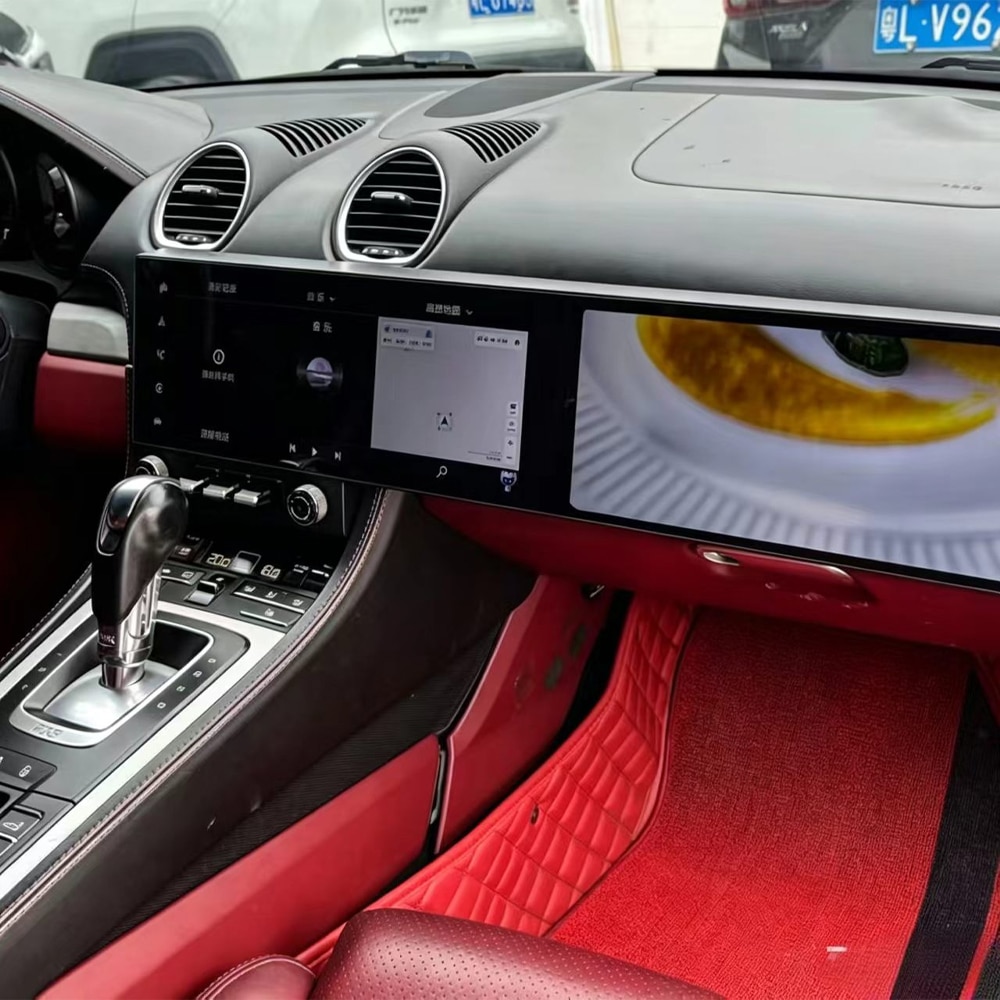
Actualización de pantalla del Porsche 718 Cayman: ¿retrofit de CarPlay o cabina de doble 12.3″?
Decide según el resultado que quieres, no según qué producto tenga la lista de funciones más larga.
Elige un enfoque solo CarPlay cuando estés satisfecho con la pantalla original y tu objetivo principal sea simplemente proyectar las funciones compatibles del teléfono.
Choose the full dual-screen route when you want the dashboard itself to change: a wider navigation area, Wireless CarPlay, Android Auto, Android applications, GPS, Wi-Fi/4G connectivity and a much more visible interior transformation.
Porsche 718 Cayman Screen Upgrade: Which Route Should You Choose Before Buying?
Best when the existing screen, connectivity and appearance already satisfy you. There is no reason to replace a system that already delivers the experience you want.
Makes sense when phone projection is the main missing function and you want to preserve the visible factory screen environment.
Best matched to owners who want the visible cockpit, navigation, phone integration and Android environment to change together.
Looking for the full cockpit route?
View the current LHD/RHD and memory configurations on the live Porsche 718 product page.
Porsche 718 Cayman Screen Upgrade: Why Android Phone Owners Have a Different Buying Decision
If Google Maps, Waze, Spotify and an Android phone are already part of your daily routine, the useful question is whether you want to keep adapting the phone to the older infotainment environment or make the vehicle work more naturally with the phone you already use.
The current iKAGOO route supports Android Auto and also provides a full Android 15 platform. That means the upgrade is not limited to mirroring a compatible phone. Supported navigation and media applications can also operate through the Android system itself.
Porsche 718 Cayman Screen Upgrade: Which 2016–2023 Models and Names Does This Guide Refer To?
| Market / Search Language | Names Owners Commonly Use | What It Means When Ordering |
|---|---|---|
| Estados Unidos / Canadá | Porsche 718 Cayman, 718 Cayman S, 718 Cayman GTS, 718 Cayman GT4 | Send the exact year, trim and original dashboard. The trim name alone does not confirm screen compatibility. |
| Reino Unido / Irlanda | Porsche 718 Cayman, Cayman 718, Porsche 982 Cayman | RHD must be confirmed. Audio, camera and original PCM details still matter. |
| Alemania / Europa continental | Porsche 718 Cayman, 718 Cayman, Cayman 982 / 982 Cayman | The product route remains vehicle-specific regardless of local language or registration market. |
| Australia / Nueva Zelanda | Porsche 718 Cayman, 982 Cayman | Confirm RHD plus the original infotainment, amplifier and camera configuration. |
| Middle East / Asia | Porsche 718 Cayman, Cayman 718, Porsche 982 | Confirm market vehicle, steering position and actual dashboard equipment before preparation. |
982 is widely used as a generation/platform reference for this 718 family. The related 718 Boxster belongs to the same broader generation, but the current iKAGOO product page discussed here is specifically listed as a Porsche 718 Cayman 2016–2023 product. Do not assume Boxster compatibility from the family name alone.
The same caution applies to trims such as S, GTS and GT4: the badge helps identify the vehicle, but the actual dashboard and electronics determine the final product route.
Porsche 718 Cayman Screen Upgrade: How Do You Modernize the Cabin Without Making It Look Like a Universal Tablet?
In a Porsche, visual integration matters almost as much as the new function. A large screen can technically work and still make the cabin look less coherent if it appears added on rather than designed around the dashboard.
The iKAGOO route uses a complete wide display assembly positioned around the 718 dashboard structure. The objective is a deliberate cockpit conversion rather than a tablet mounted above the original trim.
That matters to an owner who still likes the Porsche interior. The upgrade should make the technology feel newer without making the car feel less like the car you chose.
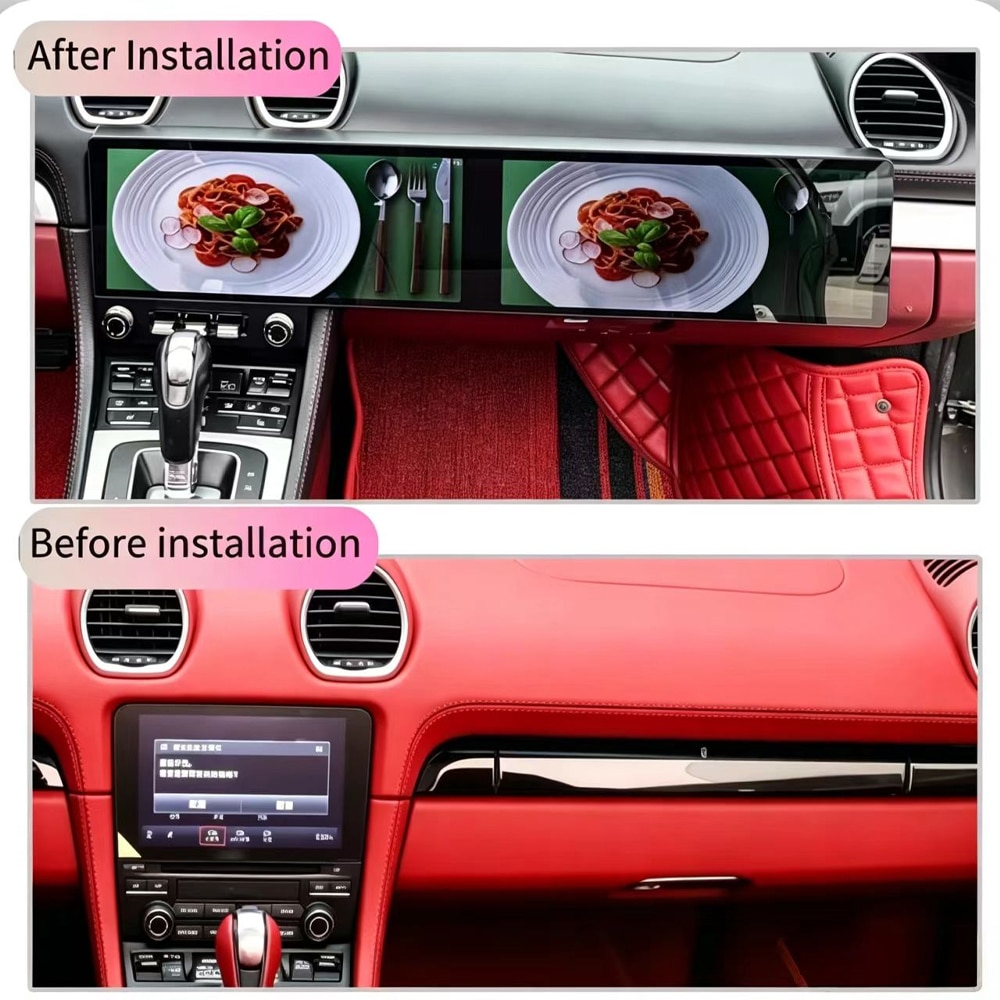
Porsche 718 Cayman Screen Upgrade: What Do You Actually Gain Every Time You Drive?
The current product also lists GPS, Wi-Fi and compatible 4G connectivity. These are useful because the screen can operate as a connected multimedia system, rather than becoming useless whenever the phone is not being mirrored.
Porsche 718 Cayman Screen Upgrade: What Happens to the Original Porsche Functions?
This is one of the most important places to stop comparing only RAM, Android version and screen size. The expensive mistake is not buying a screen with slightly less storage. It is buying the wrong integration route for the actual Porsche.
Porsche 718 Cayman Screen Upgrade: Why Can Two Similar-Looking Screens Be Very Different Purchases?
| What the Buyer Sees | What Actually Affects the Result | How iKAGOO Handles It |
|---|---|---|
| Two wide 12.3″ screens | Physical dashboard structure and LHD/RHD layout | Separate LHD/RHD product configurations are listed. |
| Wireless CarPlay logo | Whether you need only projection or a complete Android cockpit | The product combines CarPlay, Android Auto and full Android rather than presenting CarPlay as the whole upgrade. |
| Same-looking rear connectors | Original PCM, amplifier, MOST fiber, camera and controls | Vehicle details can be reviewed before the final kit is prepared. |
| Similar Android specification | Correct CAN/interface configuration and installation support | The original order remains the reference for setup and diagnosis. |
| Lower purchase price | What happens if a camera, audio route or setting needs help after installation | iKAGOO keeps compatibility and after-sales history connected to the verified order. |
That is why the most useful comparison is not “Which seller has a 12.3-inch screen?” It is “Which purchase gives me the best chance of getting the result I expect in my actual 718?”
Porsche 718 Cayman Screen Upgrade: Should You Buy 6GB+128GB or 12GB+256GB?
The practical choice when your normal use is Wireless CarPlay, Android Auto, navigation, music and a moderate number of Android applications.
Better suited to buyers who expect heavier Android app use, larger offline maps or more locally stored media over longer ownership.
Both current configurations use the listed dual-screen design, Android platform, octa-core processor and phone-connectivity route.
More memory should be chosen because your intended use justifies it. It should not be treated as proof that every CarPlay or navigation task will automatically feel different.
Want to see the live configurations?
Use the product page for current options and checkout pricing rather than relying on an old article price.
Porsche 718 Cayman Screen Upgrade: How Much Does It Cost and What Should You Compare?
When you search Porsche 718 screen upgrade cost, compare the complete route: display assembly, memory configuration, LHD/RHD version, required vehicle-specific harness/interface, compatibility review, installation requirements, shipping and the support available after installation.
The iKAGOO product page shows the current price and selectable configuration. Shipping is calculated for the destination, and eligible tax-prepaid/DDP routes depend on the current checkout or confirmed shipping route.
Porsche 718 Cayman Screen Upgrade: Is the Dual-Screen System Really Plug-and-Play?
The current iKAGOO route is designed around vehicle-matched connections without intentionally cutting the original main harness under the approved configuration. Installation still includes dashboard work, cable routing, interface connection, setup and complete function testing.
Professional installation is recommended, especially when the vehicle has premium audio, MOST fiber, factory camera equipment, previous aftermarket wiring or a configuration that requires additional interface verification.
| Before Closing the Dashboard | Por qué es importante |
|---|---|
| Test audio output | Confirms the amplifier and audio route before trim is reinstalled. |
| Test steering controls | Confirms the matched control/CAN configuration. |
| Test factory camera | Allows camera settings or adapters to be corrected while wiring remains accessible. |
| Test CarPlay / Android Auto | Confirms phone pairing, audio and projection before final assembly. |
| Test original-system switching | Confirms supported original interface access on the approved vehicle route. |
| Test startup / shutdown / sleep | Helps identify configuration or power-management issues before the job is considered finished. |
Porsche 718 Cayman Screen Upgrade: What About a Digital Instrument Cluster?
Aftermarket digital instrument-cluster solutions for the 718/982 platform do exist. However, iKAGOO does not currently list a dedicated Porsche 718 Cayman digital instrument cluster for direct purchase. The current iKAGOO Porsche cluster category lists a Cayenne-specific product, and that product should not be presented as a 718 solution simply because both vehicles carry a Porsche badge.
If your goal is a more complete cockpit transformation, start with the confirmed 718 dual-screen route and send a clear powered-on photograph of the original instrument cluster when requesting compatibility review. That gives iKAGOO a real vehicle reference before discussing any future driver-display route.
Want the center screen now and also want us to review the instrument area?
Send both the center dashboard and powered-on original cluster in the compatibility request.
Porsche 718 Cayman Screen Upgrade: What Should You Confirm Before You Pay?
If you already know the correct product, you can order directly. If you are uncertain, use the iKAGOO Compatibility & Installation Guide before purchasing.
After payment, the order follows the iKAGOO vehicle-specific preparation process before dispatch.
Porsche 718 Cayman Screen Upgrade: Why Buy the Upgrade from iKAGOO?
This is the difference between buying a photograph of a screen and buying a vehicle-specific upgrade route. Automotive electronics can still need configuration, troubleshooting, software guidance or replacement parts long after the first installation day.
iKAGOO's current warranty and long-term support policy explains the 12-month hardware warranty and the separate software and parts-support commitments. The return and compatibility protection policy explains how approved compatibility and return cases are handled.
International buyers can also review the current política de envío before checkout.
Porsche 718 Cayman Screen Upgrade: High-Intent Questions Buyers Ask Before Ordering
Is a Porsche 718 Cayman Screen Upgrade worth it?
It is most compelling when you still want to keep the 718 but want a substantially newer navigation, phone and cockpit experience. The value is strongest when you regularly use maps, music, calls, CarPlay or Android Auto and want more than the original screen environment provides.
Which years does the Porsche 718 Cayman Screen Upgrade support?
The current iKAGOO product is listed for selected Porsche 718 Cayman vehicles from 2016–2023. Year alone does not confirm compatibility. The original dashboard, PCM, audio, camera and LHD/RHD configuration should still be checked.
Does every 2016–2023 Porsche 718 Cayman have Apple CarPlay?
No assumption should be made from the model year alone. Factory connectivity varies with year and original equipment. Check what your actual PCM already provides before deciding whether you need a CarPlay-only solution or a complete screen upgrade.
Can a Porsche 718 Cayman Screen Upgrade add Wireless Apple CarPlay?
Sí. Wireless Apple CarPlay is included in the current iKAGOO dual-screen configuration for compatible phones and supported applications.
Can a Porsche 718 Cayman Screen Upgrade add Android Auto?
Sí. Android Auto is included in the current iKAGOO product, together with an independent Android 15 multimedia platform.
Should I add CarPlay or buy a full Porsche 718 Cayman Screen Upgrade?
Choose according to what you want to change. A CarPlay-focused retrofit is appropriate when the original screen is satisfactory and phone projection is the main missing function. Choose the dual-screen route when you want a much larger cockpit change plus CarPlay, Android Auto and Android applications.
What is the difference between a CarPlay retrofit and a Porsche 718 Cayman Screen Upgrade?
A CarPlay retrofit mainly changes phone connectivity; the dual-screen upgrade changes the visible infotainment environment as well. The iKAGOO route uses dual 12.3-inch QLED displays with Android 15, Wireless CarPlay, Android Auto, GPS, Wi-Fi and compatible 4G connectivity.
Will a Porsche 718 Cayman Screen Upgrade keep the original steering-wheel controls?
Supported original steering-wheel controls remain available after correct installation and configuration. Common supported functions include volume, track selection and applicable call controls.
Can I still access the original Porsche system after a Porsche 718 Cayman Screen Upgrade?
Original/Android system switching is supported where the confirmed original configuration and matched interface support it. This is one reason the original system should be identified before shipment.
Will a Porsche 718 Cayman Screen Upgrade work with the factory reverse camera?
The factory-camera route depends on the actual vehicle configuration. Tell iKAGOO which camera system is installed so the required integration can be reviewed before the final kit is prepared.
Will a Porsche 718 Cayman Screen Upgrade work with BOSE, premium audio or MOST fiber?
Premium amplifier and fiber-optic configurations must be identified rather than assumed. Send the audio-system information during compatibility review so iKAGOO can check the appropriate connection route.
Does the Porsche 718 Cayman Screen Upgrade fit both LHD and RHD cars?
The current product lists separate Black/LHD and Black/RHD configurations. Confirm the steering position when ordering so the correct physical version can be prepared.
Is Porsche 982 the same generation discussed in this Porsche 718 Cayman Screen Upgrade guide?
982 is a commonly used generation/platform reference for the 718 Cayman family discussed here. The actual iKAGOO product scope should still be followed rather than using the platform code alone as a fitment guarantee.
How much does a Porsche 718 Cayman Screen Upgrade cost?
Use the live product page for the current configured price. The final purchase can vary with memory configuration, destination, shipping and the applicable tax/DDP route. Compare the complete matched and supported upgrade rather than screen hardware alone.
Which memory should I choose for a Porsche 718 Cayman Screen Upgrade?
6GB+128GB is the practical route for normal CarPlay, Android Auto, navigation, music and everyday app use. Choose 12GB+256GB when you expect heavier Android application use, larger offline maps or more local media storage.
Is the Porsche 718 Cayman Screen Upgrade plug-and-play?
The approved product uses a vehicle-matched connection route, but professional installation is still recommended. Dashboard removal, harness connection, cable routing, setup and complete function testing remain part of the job.
What photos should I send before ordering a Porsche 718 Cayman Screen Upgrade?
Send the complete center dashboard and the original system switched on. Also provide the exact vehicle year, LHD/RHD position, audio system, factory-camera information and details of previous aftermarket modifications where applicable.
Can iKAGOO check my Porsche 718 Cayman Screen Upgrade compatibility before I buy?
Sí. Use the iKAGOO compatibility route when you are unsure. If you already know the correct product, you can order directly and the paid order still enters the final pre-shipment compatibility/configuration process.
What happens if my Porsche 718 Cayman Screen Upgrade needs configuration after installation?
Your original iKAGOO order remains the reference for the supplied product version and reviewed vehicle information. This gives installation and after-sales diagnosis a known starting point instead of treating the screen as unidentified third-party hardware.
Is there a digital instrument cluster to match a Porsche 718 Cayman Screen Upgrade?
Digital-cluster solutions for the 718/982 platform exist in the aftermarket, but iKAGOO does not currently list a dedicated 718 Cayman digital cluster for direct purchase. Send a powered-on original-cluster photo if you want iKAGOO to review the driver-display route rather than substituting an unconfirmed Porsche cluster.
Porsche 718 Cayman Screen Upgrade: Useful iKAGOO Pages Before You Order
Porsche 718 Cayman Screen Upgrade: Keep What You Love About the Car and Change What Feels Old
The strongest reason to upgrade a 718 is not that the Porsche itself has become obsolete. It is almost the opposite: the car can still be worth keeping precisely because the driving experience has aged better than the technology you touch every day.
If you only need CarPlay, solve the CarPlay problem. If you want the dashboard, navigation, Android connectivity and overall cabin experience to feel substantially newer, the dual 12.3-inch route is a different level of upgrade.
And once you decide that is the result you want, the next question should not be whether another seller has a screen that looks similar. It should be whether the product is being matched to your actual Porsche, whether the original equipment has been considered, and whether somebody still knows which hardware you received after the installation is complete.
That is where iKAGOO is intended to be different: vehicle-specific review before shipment, a matched product route, installation support tied to the order and a published long-term support path after delivery.
Current product scope: selected Porsche 718 Cayman 2016–2023 · dual 12.3″ QLED · 2400×896 · Android 15 · UIS7870SC octa-core · 6GB+128GB / 12GB+256GB · Wireless Apple CarPlay · Android Auto · GPS · 4G · Wi-Fi · Black/LHD or Black/RHD. Final fitment and retained-function behavior follow the confirmed vehicle configuration and current product terms.








Add comment
Lo siento, debes estar conectado para publicar un comentario.