Tema XStore

No products in the cart.

Hasta 23%
  • Ford Raptor Digital Cluster for 2009-2014 F150 | 13.1" Linux Virtual Cockpit
  • 12
  • 02 1
  • 07
  • cuadro de mandos virtual
  • cuadro de mandos virtual
  • 05 1

Ford Raptor Digital Cluster para 2009-2014 F150 | 13.1″ Linux Virtual Cockpit

Marca:
(1 valoración de cliente)

From: $1,380.00

Libre de impuestos Sólo UE y EE.UU.
Detalles
Asegurado por PayPal
DDP Servicio de pago de impuestos

Nos encargamos de todo el IVA y los aranceles. Ahorro estimado: $120-$280.

Estados Unidos (48 Estados)AustriaBélgicaBulgariaCroaciaChipreChequiaDinamarcaEstoniaFinlandiaFranciaAlemaniaGreciaHungríaIrlandaItaliaLetoniaLituaniaLuxemburgoMaltaPaíses BajosPoloniaPortugalRumaníaEslovaquiaEsloveniaEspañaSuecia
o

¿Tiene alguna pregunta?

No dude en Póngase en contacto

Pague de forma segura con Paypal Pague de forma segura con Visa Pague con seguridad con Master Card Pague de forma segura con JCB Pague de forma segura con American Express Pague de forma segura con Alipay Paga de forma segura con Google Pay Pague con seguridad con Klarna Pague de forma segura con DISCOVER Paga de forma segura con Apple Pay
Garantizar un pago seguro
Protección al comprador de iKAGOO

Protección de compra para este producto

Revisión de compatibilidad, pago seguro, envío con seguimiento y un eficaz servicio posventa.

Los requisitos de elegibilidad, los plazos de notificación y las medidas correctivas dependen de la política de iKAGOO aplicable y del análisis de cada caso.

Ver políticas de protección

2009–2014 F-150 · 2010–2014 SVT Raptor

Modern Digital View for Your Ford Raptor Digital Cluster Dashboard

Este Cuadro de instrumentos digital del Ford F150 (2009-2014) upgrades the original analog gauge area into a 13.1-inch Linux virtual cockpit. It supports original vehicle data, multiple Raptor-style UI themes, steering-wheel control operation, CarPlay / Android Auto map information display and map mirroring from a compatible Android head unit.

13.1-inch HD IPS 1920 × 932 Linux · Fast Start Six OEM-Style UI Themes CarPlay / Android Auto Map Display Factory Data Retained Mandos en el volante No Intended Wire Cutting
Check My Truck First

iKAGOO prepares the correct 2009–2012 or 2013–2014 cluster version, connection solution and installation guidance from your vehicle information.

Best suited to:

F-150 and SVT Raptor owners who want a full digital driver display, original vehicle information, off-road UI themes and phone navigation information shown in the instrument area while keeping the original dashboard style.

Installed Driver’s View

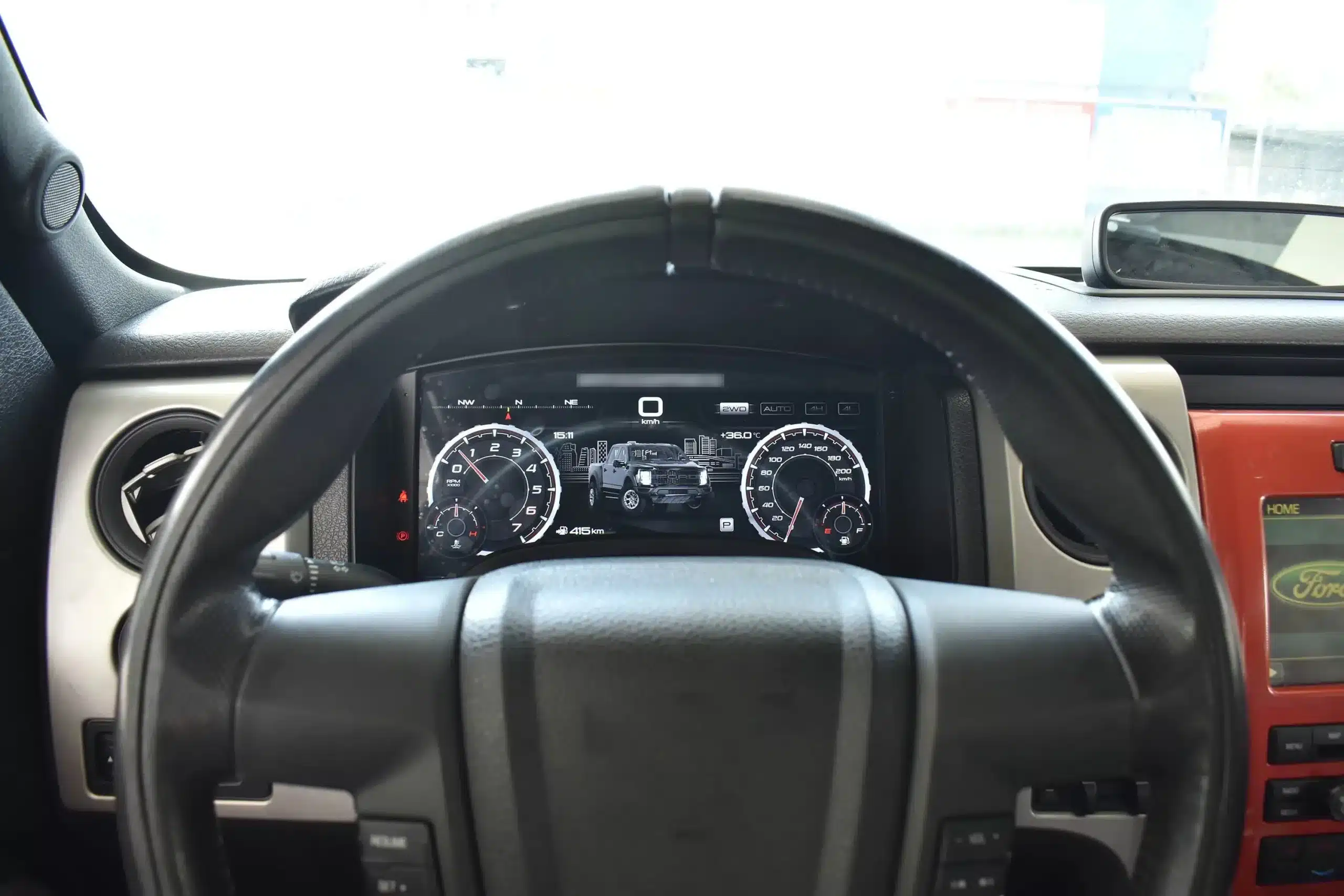
The large digital display fits inside the original cluster position, giving the truck a modern cockpit view without making the dashboard look like a cheap universal screen installation.

2009-2014 Ford F150 digital instrument cluster installed behind the steering wheel
Respuesta rápida
This is a vehicle-specific digital instrument cluster for 2009–2012 and 2013–2014 Ford F-150 dashboard layouts, including the 2010–2014 first-generation SVT Raptor when the original cluster structure matches. It upgrades the driver display and can show supported original vehicle data, CarPlay / Android Auto map information and Android head unit map mirroring when the connected system supports it.

Daily-Use Improvement

Why This Ford F150 Digital Dash Upgrade Feels Meaningfully Newer

The strongest value is not only the screen size. The upgrade changes how you read speed, RPM, tire pressure, oil information, fuel data, navigation direction and off-road status during normal driving.

Clearer Driving Data

Speed, RPM, gear position, fuel range, oil information, water temperature, TPMS and supported warnings are easier to read than on the original analog layout.

CarPlay / Android Auto Map Display

When paired with the compatible source system, the cluster can show phone navigation and Android head unit map information in the driver’s display area, reducing the need to look away from the road.

Raptor-Style UI Modes

The interface includes multiple visual themes for city driving, speed-focused driving, snow, sand, desert and drivetrain-focused views, making the upgrade feel closer to a modern Raptor cockpit.

Funciones de fábrica conservadas

Original Vehicle Information and Driver Controls Continue to Work

With the correct year version, retained original instrument electronics and proper installation, the cluster continues to present the important driving information your F-150 supplies.

  • Original mileage data and vehicle-specific instrument information
  • Speed, engine RPM and transmission gear display
  • Fuel level, instant fuel use and driving range
  • Supported tire-pressure monitoring information
  • Supported coolant, oil and maintenance information
  • Door status, warning indicators and vehicle alerts
  • MPH and km/h unit selection
  • Factory steering-wheel directional and OK controls
  • Supported 4WD and off-road driving information
  • CarPlay / Android Auto map display when connected to a compatible source
  • Android head unit map mirroring when the paired head unit supports output
  • Multiple OEM-style and Raptor-style UI layouts
Special factory configurations, previous wiring modifications, non-standard steering controls or an aftermarket right-hand-drive conversion may need additional connection guidance. Send a clear dashboard and original-cluster photo before ordering so iKAGOO can prepare the correct version.

Prepared for Your Truck

¿Por qué los propietarios eligen iKAGOO?

Year-Specific Matching

We separate the 2009–2012 and 2013–2014 dashboard versions instead of treating every 12th-generation F-150 as identical.

Navigation Display Preparation

We help you confirm whether your CarPlay, Android Auto or Android head unit map source can feed navigation information to the digital cluster.

Original Data Continuity

The installation path retains the required original instrument electronics so vehicle-specific data is not treated like a generic replacement cluster.

Function Testing Guidance

We help you check speed, RPM, gear, warnings, TPMS, map display, steering controls, units and sleep behavior before final reassembly.

Protección del cableado de fábrica

The matched installation is designed to connect without intentionally cutting the supported factory main wiring.

Servicio posventa

You receive installation and configuration assistance plus a 12-month limited hardware warranty for eligible manufacturing defects.

Vehicle-Specific Hardware

A Complete Digital Cluster Built for the F-150 Dashboard

The molded housing follows the original instrument opening so the finished result looks like a deliberate cockpit upgrade rather than a tablet added on top of the dashboard.

13.1-inch digital instrument cluster housing for 2009-2014 Ford F150

Correct Year Selection

Match the Original Cluster Before You Order

The 2009–2012 and 2013–2014 factory layouts are not identical. Choose the matching year option and send your original cluster photo. The cluster can retain original vehicle data and display supported phone-navigation information when the connected source is compatible.

2009-2012 and 2013-2014 Ford F150 original cluster layouts compared with digital cluster installation

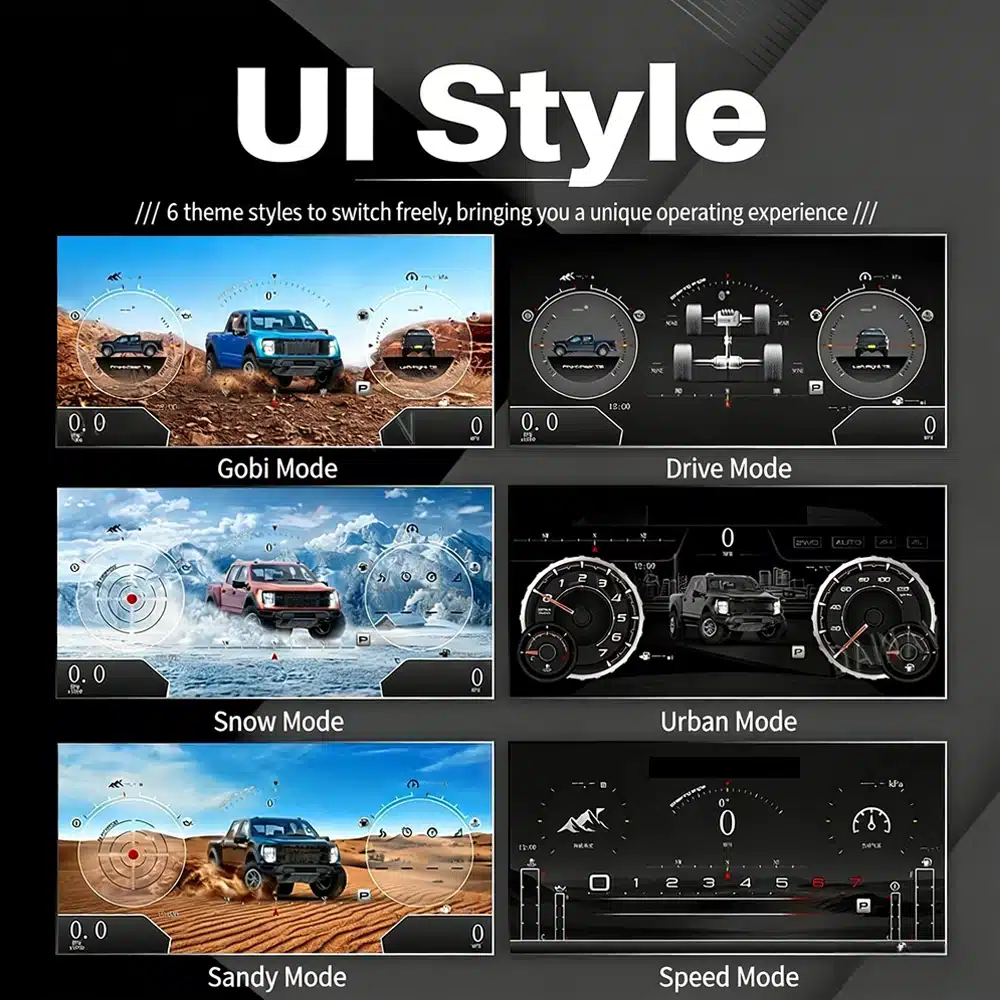
High-Definition UI Styles

Six Clear OEM-Style UI Views for Road and Off-Road Driving

This clear UI image replaces the low-resolution dial-switch image. The available styles include Gobi Mode, Drive Mode, Snow Mode, Urban Mode, Sandy Mode and Speed Mode, giving your F-150 or Raptor a more modern factory-style digital cockpit.

six clear UI styles for Ford F150 Raptor digital instrument cluster including Gobi Drive Snow Urban Sandy and Speed modes

Selectable Cockpit Themes

Switch Between Off-Road, Urban and Performance Views

The display can prioritize different information depending on how you use the truck: city driving, highway speed, desert driving, snow, sand, drivetrain status or daily vehicle information.

multiple digital gauge themes available on the Ford F150 digital cluster

CarPlay and Android Auto Map Information

Show Navigation Information in the Driver Display

When your connected CarPlay, Android Auto or Android head unit system supports output to the cluster, the instrument screen can present map and navigation information closer to your normal driving view.

Ford F150 digital cluster supporting CarPlay Android Auto and navigation map display information

Multilingual Interface

Use the Cluster in Your Preferred Language

The Linux interface supports multiple languages, including English, Spanish, French, German, Russian, Portuguese, Turkish, Korean, Chinese and Arabic. Ask iKAGOO about your preferred language when placing the order.

multilingual interface options for Ford F150 Linux digital instrument cluster

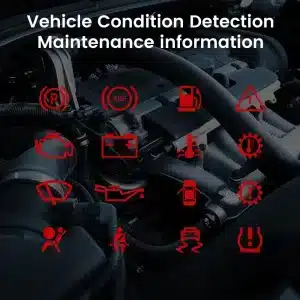
Warnings and Maintenance

Keep Important Vehicle Conditions Visible

Supported warning indicators, maintenance information and vehicle-status messages remain part of the driving experience, helping you notice issues without returning to the limited original display.

vehicle warning and maintenance indicators supported by the Ford F150 digital cluster

Fast Linux Startup

The Instrument Display Is Ready Within Seconds

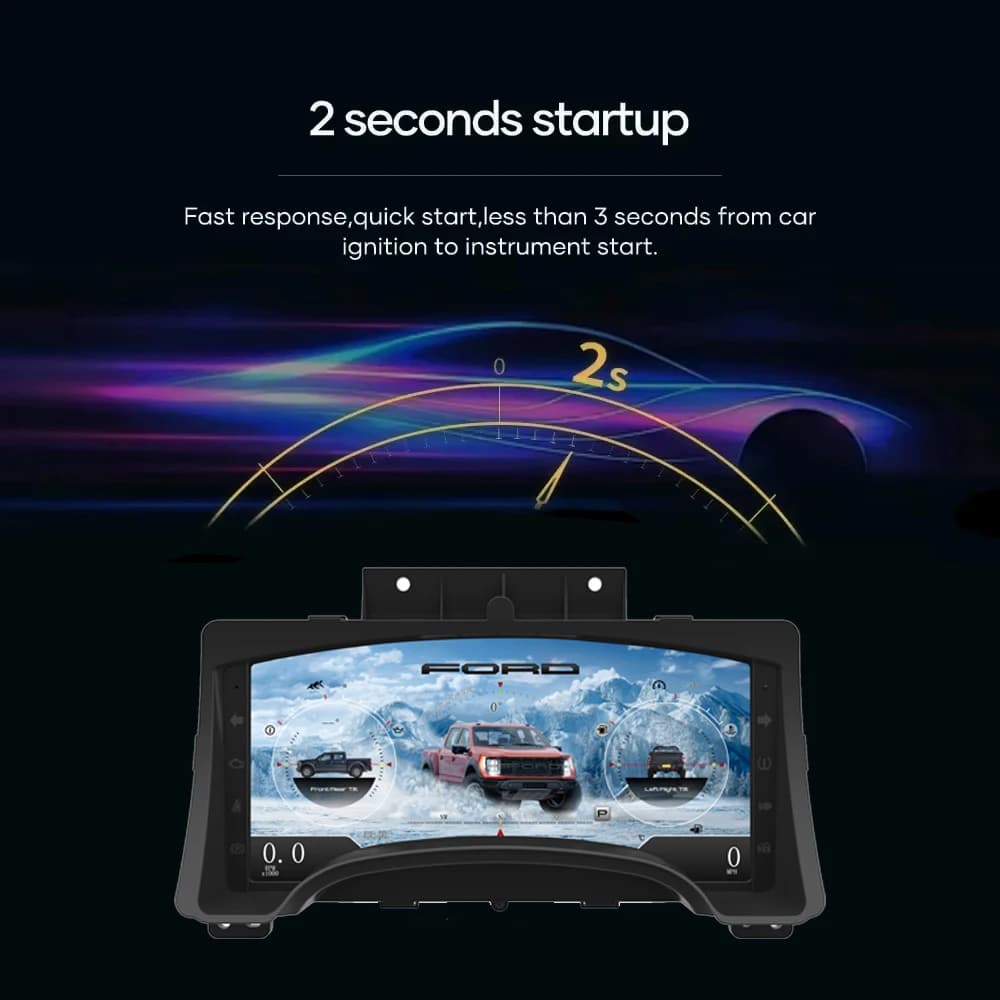
A dedicated Linux platform keeps startup focused on driving information. The specified startup time is under two seconds after ignition.

fast startup screen for Ford F150 Linux digital instrument cluster

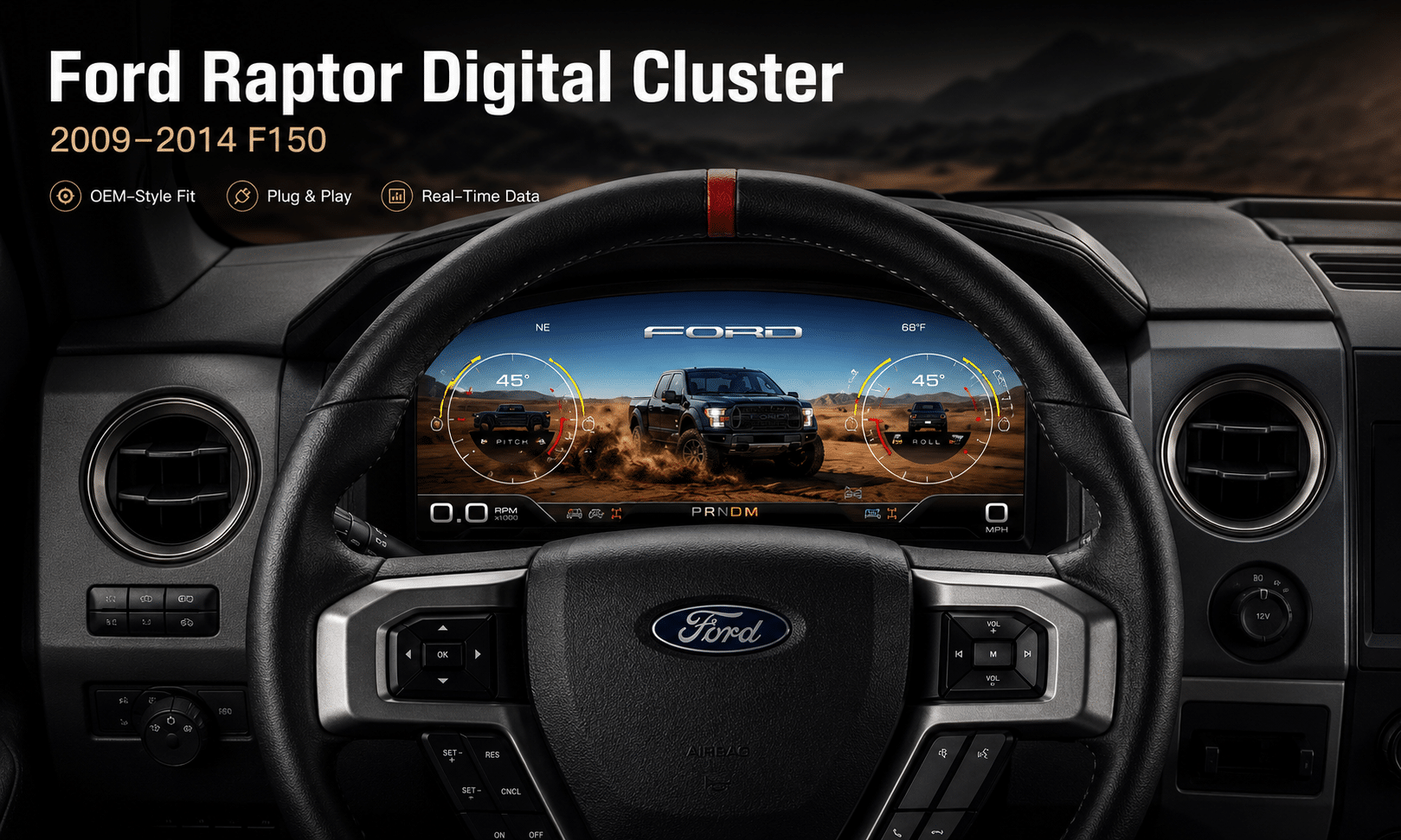
Installed Driving View

A Modern Driver’s View Without Rebuilding the Cabin

The wide screen sits behind the original steering wheel and within the existing dashboard architecture, creating a larger visual upgrade while leaving the center stack and surrounding interior intact.

Ford F150 digital instrument cluster installed in the original dashboard

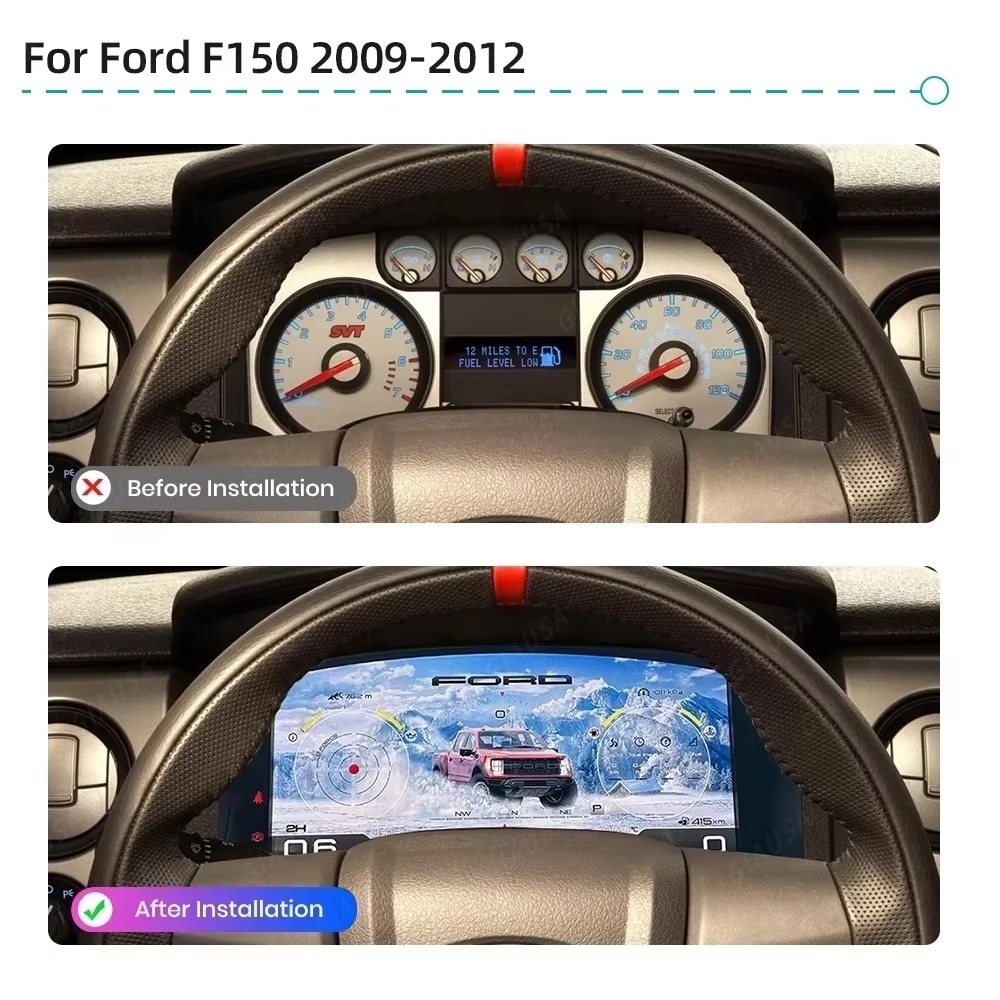
Antes y después

See the Difference From the Same Driving Position

The original analog cluster provides basic information, while the digital replacement creates a wider, brighter and more configurable view directly in the driver’s normal line of sight.

before and after comparison of a 2009-2012 Ford F150 analog cluster and digital cluster

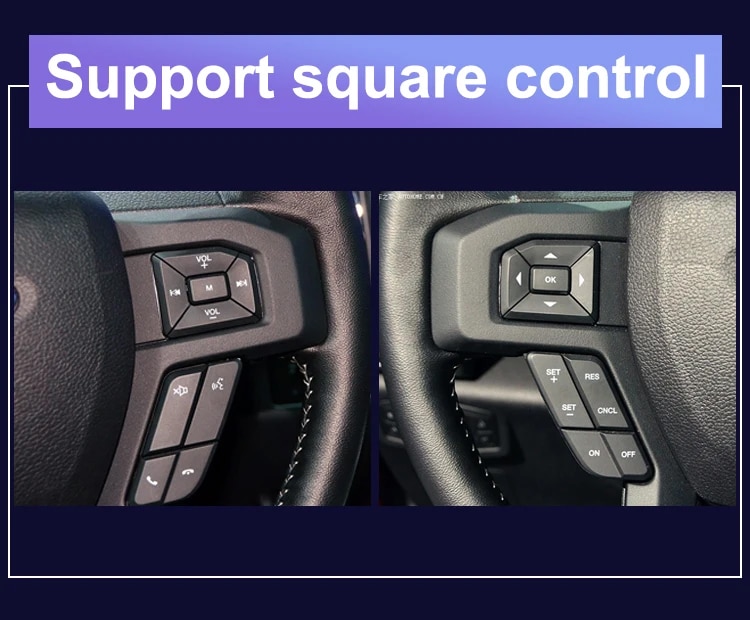
Factory Controls

Continue Using the Steering-Wheel Directional Controls

The supported factory arrow and OK controls let you move through cluster pages, settings and UI modes without adding an unrelated controller to the dashboard.

Ford F150 steering wheel controls supported by the digital instrument cluster

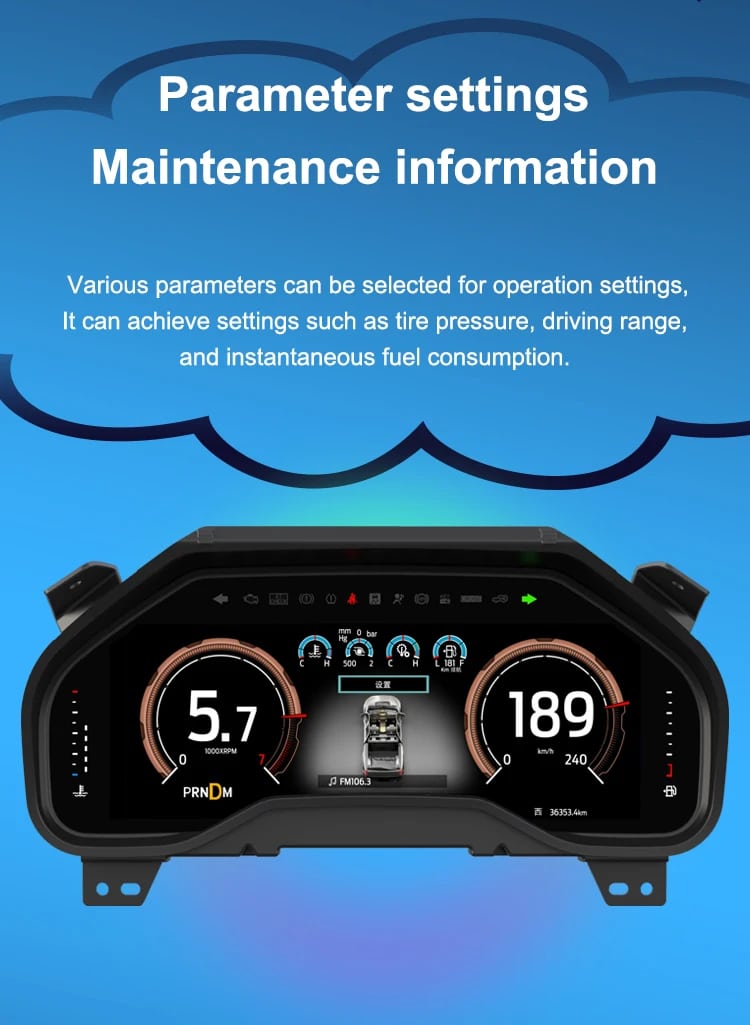
Datos del vehículo

Bring Range, Tire Pressure, Oil and Fuel Information Into One View

The screen layout can vary by year version and selected theme, but the purpose is consistent: make supported vehicle, maintenance, off-road and navigation information easier to find during daily use.

digital cluster parameter settings and maintenance information interface

Feature Overview

A Focused Digital Cluster With Navigation Information Support

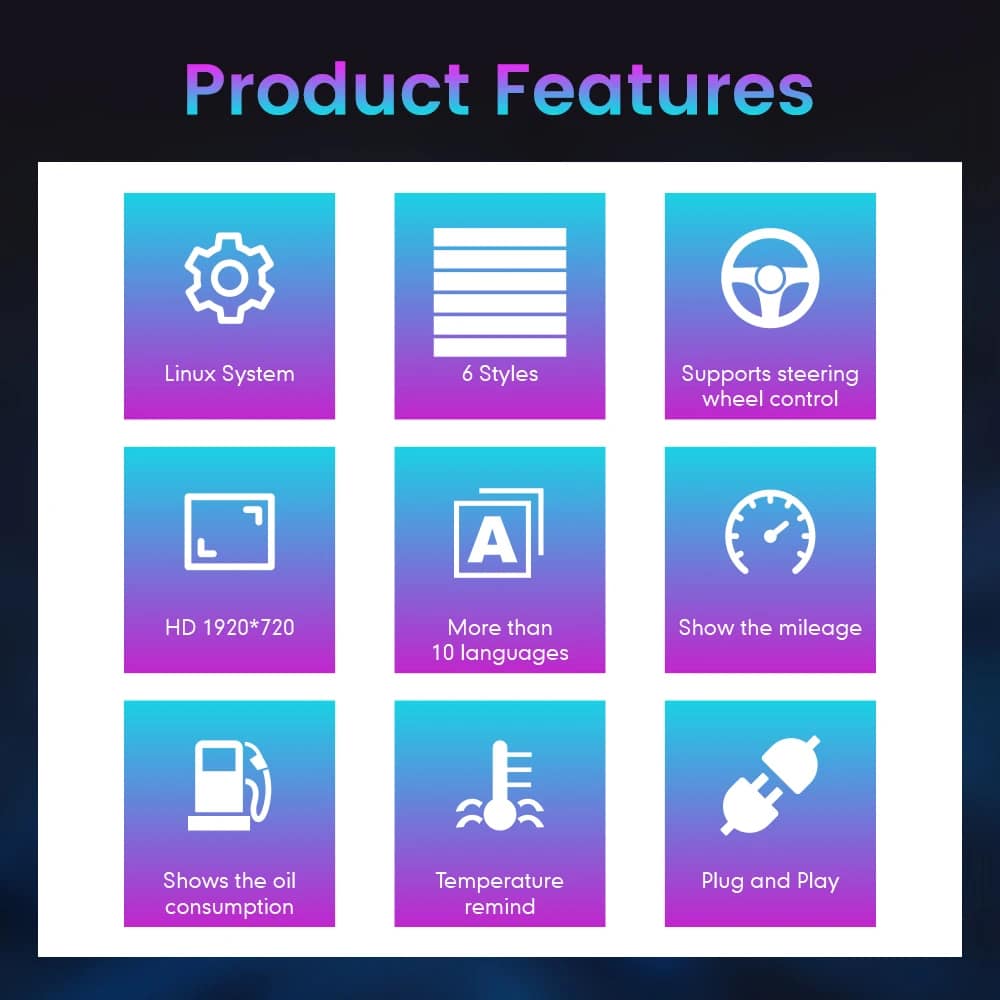
The cluster is built around Linux, selectable layouts, steering-wheel control, mileage display, vehicle-status information and supported CarPlay / Android Auto / Android head unit map information display. For your order, iKAGOO prepares the 13.1-inch, 1920 × 932 configuration stated in the purchase specifications.

feature overview for Ford F150 Linux digital instrument cluster with vehicle data and navigation information support

Vehicle and Regional Name Guide

Choose by Generation and Dashboard—Not Only the Badge Name

This cluster is built around the 12th-generation F-150 dashboard architecture. The purchase area currently provides two hardware groups because the original cluster structure changes across the production run.

2009–2012 Ford F-150

Select the 2009–2012 option and provide a clear photo of the original cluster. This includes matching trucks with the earlier gauge layout.

2013–2014 Ford F-150

Select the 2013–2014 option and provide the later original cluster photo so the correct physical version can be prepared.

2010–2014 Ford F-150 SVT Raptor

The first-generation Raptor belongs to this F-150 generation. Match by model year and original cluster appearance; there is no 2009 model-year SVT Raptor.

Ford Lobo / Lobo Raptor

Mexican-market badge names can refer to the same generation, but the dashboard, original cluster and connector configuration must match before ordering.

LHD and RHD-Converted Trucks

This product is prepared around the North American left-hand-drive dashboard shown. For an aftermarket RHD conversion, send full dashboard and steering-control photos before purchase.

2015–2020 F-150 / Raptor

Do not choose this 2009–2014 version. Use the separate 2015–2020 F-150 digital cluster page .

Before shipment, provide: model year, trim, market, engine/fuel type, original cluster photo, full dashboard photo, steering-wheel control photo, original Android head unit or CarPlay source information, and any previous wiring modification. This helps iKAGOO prepare the correct screen, connection solution and map-display guidance.

Especificaciones del producto

13.1-Inch Linux Virtual Cockpit Specifications

Tipo de producto Reacondicionamiento del cuadro de instrumentos digital / cuadro de instrumentos LCD / Virtual Cockpit
SKU FD-123
Opciones del vehículo 2009–2012 F-150; 2013–2014 F-150
Raptor Application 2010–2014 first-generation SVT Raptor when dashboard and original cluster match
Pantalla 13.1-inch HD IPS display with anti-glare treatment
Resolución 1920 × 932
Sistema operativo Linux
Procesador T5 quad-core, 1.5 GHz
Memoria 1 GB RAM + 4 GB storage
Startup Under 2 seconds
Display Styles Six selectable OEM-style / Raptor-style UI themes
Navigation Information Supports CarPlay / Android Auto map information and Android head unit map mirroring when connected source supports output
Units Miles and kilometers
Tensión de funcionamiento 9–16 V DC
Método de instalación Matched plug connection, retained original instrument electronics where required, no intended cutting of supported factory main wiring
Package Weight 4.5 kg
Tamaño del paquete 45 × 35 × 25 cm
The product is sold in two year-based versions, not RAM/storage variants. Select the correct model-year option in the WooCommerce purchase area and use the current displayed price there.

Preparación del pedido

How iKAGOO Prepares the Correct Cluster

Vehicle Details

Provide the model year, trim, engine/fuel type and market.

Dashboard Photos

Send the original cluster and a full driver-side dashboard photo.

Year Version

We match the 2009–2012 or 2013–2014 hardware configuration.

Map Source Check

Confirm CarPlay, Android Auto or Android head unit map output before shipment.

Asistencia para la instalación

After delivery, use the provided guidance and contact iKAGOO if the layout or map display behavior differs.

View Fitment Details

iKAGOO Purchase Evaluations

Three Practical Results for This Upgrade

Necesidad de actualizar iKAGOO

94/100 Argumentos sólidos a favor de la mejora
  • Large visual change from analog gauges
  • More useful information in the normal driving view
  • CarPlay / Android Auto map information support
  • Strong value for owners keeping the truck
Cómo se determina este resultado
This product is evaluated under the iKAGOO Upgrade Necessity framework, considering the factory system, daily-use improvement, long-term ownership value and practical alternatives.
Read the public evaluation framework

Compatibilidad de iKAGOO Original con vehículos

92/100 High Integration
  • Original steering controls supported
  • Vehicle data and warning integration
  • Year-specific physical architecture
  • Original instrument electronics retained as required
  • Supported navigation/map display from compatible source

A score of 92/100 does not mean that 8% of factory functions are lost. The score also reflects that the new Linux interface and menu structure differ from the original Ford analog cluster.

Cómo se determina este resultado
The result follows the iKAGOO Original Vehicle Compatibility framework covering function continuity, original controls, vehicle data, physical architecture, interaction and installation integration.
Read the public compatibility framework

Dificultad de instalación de iKAGOO

Nivel 3 Bricolaje avanzado
  • Cluster and trim removal
  • Careful original-board transfer where required
  • Conexión de cableado adaptada
  • CarPlay / Android Auto / map display configuration
  • Complete function testing after installation

Suitable for an experienced DIY installer or an automotive electronics installer. The level describes the work required; it does not indicate lower product quality or lower upgrade value.

Cómo se determina este resultado
The level is assigned under the iKAGOO Car Electronics Installation Difficulty framework, considering disassembly, wiring, configuration and testing.
Read the public installation framework

Compare the Real Outcomes

Digital Cluster Upgrade vs Repair or a Used OEM Cluster

Decision Point
Repair Existing Cluster
Cuadro de instrumentos OEM de segunda mano
Primary result
Restores the existing analog experience
Replaces the unit with another factory-era cluster
Daily information view
Original layout remains
Depends on donor cluster type
CarPlay / Android Auto map information
Not added by repair
Not normally added by used OEM cluster
Off-road and Raptor-style display
Original display remains
Limited to factory-era layout
Preparación específica para cada vehículo
Repair-focused
Depends on the donor part selected
Support after purchase
Depends on repair provider
Depends on seller
Purchase conclusion: For an owner who only wants a failed gauge repaired, repair may be enough. For an owner who wants the F-150 or Raptor cabin to feel substantially newer, the iKAGOO digital cluster gives a stronger result: larger display, selectable Raptor-style UI, original vehicle data, steering-wheel controls and supported navigation/map information in the driver display.

Instalación

Ford F150 Digital Cluster Installation: Level 3 Advanced DIY

This is not a simple USB accessory. Correct work requires careful trim removal, cluster removal, original-component handling, matched connection, CarPlay / Android Auto / Android head unit map source setup and complete function testing.

Recommended Installation Sequence

  1. Record the original mileage and photograph the factory cluster before disassembly.
  2. Disconnect the vehicle battery according to safe automotive-electrical practice.
  3. Protect the dashboard surfaces and remove the instrument trim and original cluster.
  4. Transfer the required original instrument board or related components exactly as instructed for your year version.
  5. Connect the matched harness and interface without forcing any connector.
  6. Confirm the CarPlay / Android Auto / Android head unit map source if this function is being used.
  7. Mount the digital cluster and restore power for initial setup.
  8. Select language, MPH/km/h and the applicable vehicle settings.
  9. Test speed, RPM, gear, fuel, temperature, TPMS, warnings, doors, steering controls, map display and sleep behavior.
  10. Complete final reassembly only after every supported function has been checked.

Shipping and Support

Vehicle-Specific Preparation With Clear After-Sales Coverage

Procesamiento de pedidos

Normally 1–3 business days before dispatch, with additional time when vehicle information or configuration needs clarification.

Tracked Delivery

Typical delivery after dispatch: USA/Canada 5–9 business days, EU 7–15, UK/Australia 7–10, other supported regions 7–20.

12-Month Garantía

Los defectos de fabricación y los fallos de hardware que cumplan los requisitos y se produzcan en condiciones de uso normal están cubiertos por la garantía limitada de hardware vigente.

Compatibility Remedy

When iKAGOO confirmed compatibility from accurate pre-purchase information but no reasonable solution works, the current published refund policy applies.

Preguntas de los compradores

2009–2014 Ford F150 Digital Instrument Cluster FAQ

Does this cluster support CarPlay and Android Auto map display?
Yes. The cluster supports CarPlay / Android Auto map information display when the connected source system and configuration support output to the instrument cluster. Send your Android head unit or CarPlay source details before ordering if map display is important to you.
Can it show Android head unit map mirroring?
Yes. It can support Android head unit map mirroring when the paired Android system supports the required map-output connection. iKAGOO helps confirm this during vehicle and system matching.
What UI styles does this Ford F150 digital cluster include?
The cluster includes multiple OEM-style and Raptor-style UI views, including Gobi Mode, Drive Mode, Snow Mode, Urban Mode, Sandy Mode and Speed Mode. These layouts are designed for different road, performance and off-road driving situations.
Will the Ford F150 digital cluster keep my original mileage?
The installation is designed around retaining the required original instrument electronics and synchronizing the truck’s vehicle-specific data. Record the mileage before installation and follow the supplied board-transfer and setup instructions exactly.
Do I need FORScan or dealer programming?
This installation uses a retained-original-board method and normally does not require dealer flashing. The exact procedure depends on the year version and original cluster. Do not change module coding unless iKAGOO specifically instructs you to do so for your configuration.
Does it fit both 2009–2012 and 2013–2014 F-150 trucks?
Yes, but they use separate purchase options. Select the correct year group and send the original cluster photo because the physical layout and retained components are not identical.
Does this fit a 2009 Ford Raptor?
The F-150 generation began in 2009, but the first-generation Ford F-150 SVT Raptor began with the 2010 model year. A truck described as a “2009 Raptor” should be identified by VIN, model year and dashboard photo before ordering.
Will the factory steering-wheel controls still work?
Supported factory directional and OK controls continue to operate the cluster menus, settings and UI switching after correct connection and configuration. Send a steering-wheel photo if your buttons have been replaced or modified.
Does the cluster show TPMS, fuel range, oil and warning information?
Yes. The product supports tire-pressure information, fuel-use and driving-range information, supported oil and maintenance data, door status and warning indicators supplied by the vehicle.
Can I install it in a Ford Lobo or Lobo Raptor?
Some Mexican-market Lobo models share the same 12th-generation F-150 architecture. Compatibility must be determined from the model year, dashboard, original cluster and connector configuration—not the badge name alone.
¿Qué datos debo enviar antes de hacer el pedido?
Send the model year, trim, market, engine/fuel type, original cluster photo, full dashboard photo, steering-wheel control photo, original Android head unit or CarPlay source information, and any known aftermarket wiring changes.
¿Listo para actualizar?

Make Your 2009–2014 F-150 Feel Modern Again

Choose the correct year version, send the requested vehicle photos and let iKAGOO prepare the matched digital cluster configuration, UI setup and map-display guidance for your truck.

Confirmar los datos de mi vehículo

5.00

Basado en los comentarios de 1
1
0
0
0
0

1 revisión para Ford Raptor Digital Cluster for 2009-2014 F150 | 13.1″ Linux Virtual Cockpit

  1. Michael Brown -

    Valoración total
    Relación calidad-precio

    I installed this on my 2009 Raptor. The ‘Off-road Mode’ is absolutely amazing—seeing the real-time pitch, roll angles, and tire pressure on the 13.1-inch HD screen makes the stock analog gauges look like they’re from the Stone Age. The installation was truly plug-and-play

    Pros:

    The installation was plug-and-play, the menu is lag-free, the visual effects are stunning, and the resolution is extremely high

    ¿Es útil?
Añadir un comentario

Your email address will not be published. Required fields are marked

Debes iniciar sesión para poder añadir fotos a tu reseña.

Envíos, garantía, devoluciones y atención al cliente de iKAGOO
Atención al cliente de iKAGOO

Envíos, garantía y devoluciones

Información clara sobre la tramitación de pedidos, envíos internacionales, productos específicos para cada vehículo, asistencia en materia de garantía, devoluciones y envíos dañados.

Procesamiento del pedido Normalmente, entre 1 y 3 días laborables antes del envío.
Envíos internacionales Normalmente, entre 5 y 20 días laborables tras el envío, dependiendo del destino.
Garantía del hardware Garantía limitada de 12 meses para defectos de fabricación que cumplan los requisitos.
Asistencia específica para cada vehículo Ofrecemos asistencia en materia de compatibilidad, cableado y configuración.

Preguntas frecuentes

Estas respuestas ofrecen un resumen práctico. Las páginas completas de las condiciones generales, cuyos enlaces figuran a continuación, se aplican a todos los pedidos.

01

¿Desde dónde se envían los pedidos y cuánto tarda la entrega?

La mayoría de los pedidos de iKAGOO se envían desde nuestro centro de distribución en China una vez que se han comprobado la configuración del producto y los datos del vehículo. La tramitación habitual de un pedido tarda aproximadamente 1–3 días hábiles.

Los plazos de entrega estimados tras el envío son los siguientes:

  • EE. UU. y Canadá: aproximadamente entre 5 y 9 días laborables
  • Unión Europea: entre 7 y 15 días laborables, aproximadamente
  • Reino Unido y Australia: aproximadamente entre 7 y 10 días laborables
  • Otras regiones compatibles: entre 7 y 20 días laborables aproximadamente

Los plazos de entrega estimados pueden verse afectados por los trámites aduaneros, los días festivos locales, las entregas en zonas remotas, las condiciones meteorológicas o los retrasos de la empresa de transporte.

02

¿Tendré que pagar impuestos de importación, IVA o tasas aduaneras?

El envío internacional estándar no suele incluir el IVA del país de destino, los aranceles de importación, los gastos de intermediación ni las tasas de despacho de aduana.

Para los destinos de la Unión Europea que cumplan los requisitos, una opción opcional Servicio de envío DDP pueden estar disponibles. Los gastos relacionados con la importación solo se incluyen cuando se selecciona la opción DDP al finalizar la compra o cuando iKAGOO lo confirma por escrito antes del envío.

Cuando no se selecciona la opción DDP, el destinatario es responsable de cualquier gasto que cobren las autoridades aduaneras locales o la empresa de transporte.

03

¿Puedo solicitar un envío urgente?

Es posible que haya disponible el envío exprés o urgente para determinados productos y destinos. La disponibilidad, la empresa de transporte y los costes adicionales se confirman antes del envío.

En función del destino y del tipo de producto, iKAGOO puede recurrir a transportistas como DHL, FedEx, UPS, EMS, 4PX u otro proveedor de servicios logísticos con seguimiento.

04

¿Cómo puedo hacer el seguimiento de mi envío?

Una vez que se haya enviado el pedido, el número de seguimiento o el enlace de seguimiento se enviará normalmente a la dirección de correo electrónico utilizada para realizar el pedido.

Las actualizaciones del seguimiento pueden tardar varios días laborables en aparecer mientras el paquete se transfiere entre transportistas internacionales y locales.

05

¿Cuál es la política de devoluciones y reembolsos de iKAGOO?

La posibilidad de realizar una devolución depende del motivo de la misma, del estado del producto, del estado de la instalación, de la documentación aportada y de si la devolución ha sido aprobada por iKAGOO.

En el caso de una devolución por motivos distintos a un defecto, el producto debe estar, por norma general, sin usar, sin instalar, completo y en condiciones de poder volver a venderse. Por lo general, el cliente debe hacerse cargo de los gastos de envío de la devolución autorizada.

Los gastos de envío originales, los gastos DDP, el IVA, los aranceles aduaneros y otros costes logísticos no son, por lo general, reembolsables, salvo que así lo exija la legislación aplicable o que iKAGOO confirme lo contrario.

No devuelvas ningún producto sin haber recibido una dirección de devolución autorizada y las instrucciones de devolución de iKAGOO.

06

¿Qué ocurre si iKAGOO confirma la compatibilidad pero el producto no se puede instalar?

Podría aplicarse una protección adicional cuando iKAGOO haya confirmado la compatibilidad antes de la compra, el cliente haya facilitado información precisa sobre el vehículo y haya colaborado en los pasos razonables de instalación y diagnóstico.

Si iKAGOO confirma que no existe ninguna solución técnica razonable y el problema se comunica en un plazo de 7 días naturales tras la entrega, el cliente podría tener derecho a que se le reembolse el precio del producto sin necesidad de devolverlo.

Los gastos de envío originales, el DDP, el IVA, los aranceles aduaneros y otros gastos de terceros no están incluidos en este reembolso del precio del producto.

07

¿Qué garantía ofrece iKAGOO?

Entre los productos iKAGOO que cumplen los requisitos se incluyen: Garantía limitada de hardware de 12 meses que cubre los defectos de fabricación verificados y las averías de hardware que cumplan los requisitos en condiciones normales de uso.

En función del problema, la solución puede incluir un diagnóstico a distancia, asistencia para la configuración, piezas de recambio, reparación, sustitución del producto, un reembolso parcial o un reembolso total.

Normalmente, la garantía no cubre los daños causados por un cableado incorrecto, modificaciones no autorizadas, daños accidentales, entrada de agua, golpes, uso indebido, tensión inadecuada, errores de instalación o equipos de terceros incompatibles.

08

¿El hecho de abrir el producto anula automáticamente la garantía?

Una inspección o un examen realizado por terceros no anula automáticamente la totalidad de la garantía. No obstante, no están cubiertos los daños causados por reparaciones no autorizadas, la sustitución de componentes, modificaciones incorrectas, circuitos rotos o un montaje incorrecto.

Póngase en contacto con iKAGOO antes de desmontar o reparar el producto para que se le pueda indicar el procedimiento de diagnóstico adecuado.

09

¿Qué ocurre si mi pedido llega dañado o le faltan piezas?

Ponte en contacto con iKAGOO en un plazo de 7 días naturales tras la entrega y conserva el embalaje original, la etiqueta de envío, los accesorios y el producto.

Por favor, envía fotos o vídeos nítidos en los que se vea:

  • La caja de cartón exterior y la etiqueta de envío
  • Cualquier daño visible en el embalaje
  • El producto y la zona afectada
  • Todos los accesorios y el cableado recibidos

Tras la verificación, iKAGOO podrá organizar el envío de las piezas que falten, la sustitución, la reparación, el reembolso u otra solución razonable en función de cada caso concreto.

10

¿Qué debo hacer si he pedido un producto equivocado?

Ponte en contacto con iKAGOO antes de instalar o utilizar el producto. Se podrá aprobar un cambio o una devolución siempre que el producto no haya sido utilizado, no se haya instalado, esté completo y sea apto para su reventa.

Normalmente, los clientes deben hacerse cargo de los gastos de envío y de cualquier diferencia de precio cuando se haya seleccionado un producto, un modelo de vehículo, un año de fabricación o una configuración de fábrica incorrectos.

No se proporciona automáticamente una etiqueta de devolución prepagada gratuita.

11

¿Puedo modificar o cancelar mi pedido después de haberlo pagado?

Ponte en contacto con iKAGOO lo antes posible, preferiblemente en un plazo de 12 horas después de realizar el pedido, al solicitar una dirección, la configuración de un vehículo o un cambio de producto.

Una modificación o cancelación no será efectiva hasta que iKAGOO la confirme. Los productos específicos para cada vehículo pueden pasar a la fase de adquisición, programación, pruebas, configuración o preparación personalizada poco después de realizar el pago.

Una vez que haya comenzado la preparación o el envío, es posible que no se pueda cancelar el pedido, o que se deduzcan los gastos razonables en los que ya se haya incurrido.

12

¿Qué incluye el paquete?

El contenido del paquete varía en función del producto, el modelo de vehículo, el sistema de serie y la configuración seleccionada.

Dependiendo del producto, el paquete puede incluir el dispositivo principal, mazos de cables específicos para el vehículo, una interfaz CANBUS, adaptadores, cables USB, antenas, micrófonos, accesorios de montaje y otros accesorios de instalación.

Consulte la página del producto correspondiente, las fotos del embalaje y la confirmación del pedido para conocer los componentes exactos que se incluyen.

13

¿Cómo puedo ponerme en contacto con el servicio de atención al cliente de iKAGOO?

Puedes ponerte en contacto con iKAGOO a través del formulario de contacto, por correo electrónico, por WhatsApp o mediante los canales de asistencia disponibles en la página web. El tiempo de respuesta habitual es de 24 horas laborables.

Para recibir una asistencia técnica más rápida, incluye tu número de pedido, el modelo y el año del vehículo, fotos del sistema de fábrica, fotos del producto y un vídeo nítido en el que se vea claramente el problema.

Visita: Contacto y asistencia técnica de iKAGOO

14

¿El pago es seguro? ¿Hay opciones de pago a plazos disponibles?

Los pagos se procesan a través de los métodos de pago seguros que se muestran durante el proceso de pago. Las opciones disponibles de tarjetas, monederos electrónicos y pagos a plazos pueden variar en función del país, la divisa, el proveedor de pagos y los requisitos del cliente.

Cualquier servicio de pago a plazos, incluidas las opciones que ofrecen PayPal u otros proveedores, está sujeto a la disponibilidad regional y a las normas de aprobación de dicho proveedor.

Lee las políticas completas de iKAGOO

Revisa las páginas completas de las condiciones antes de realizar el pedido, especialmente en lo que respecta a los productos específicos para cada vehículo, las disposiciones fiscales internacionales y las devoluciones relacionadas con la instalación.

Estas preguntas frecuentes constituyen una guía simplificada para el cliente. En caso de discrepancia en la redacción, prevalecerán las páginas completas de la política publicada, la confirmación del pedido y la legislación en materia de consumo aplicable.

Ford Raptor Digital Cluster for 2009-2014 F150 | 13.1" Linux Virtual Cockpit Ford Raptor Digital Cluster fo...

From: $1,380.00

Seleccionar opciones