


Velocidad y RPM digitales claras
Los grandes indicadores digitales y gráficos facilitan la lectura de la velocidad y la información del motor sin tener que depender de una pequeña pantalla central de información.

| Peso | 8 kg |
|---|---|
| Dimensiones | 48 × 38 × 28 cm |
| Coche de apoyo | 2015-2018 para el Toyota Highlander, 2018-2019 para el Toyota Highlander |
| Compatibilidad del producto | Plug-and-Play |
| Origen del producto | No es un producto original auténtico |


$780.00 El precio original era: $780.00.$680.00El precio actual es: $680.00.

Nos encargamos del IVA y los aranceles de importación aplicables a los pedidos de la UE y EE. UU. que cumplan los requisitos. Ahorro estimado: $120-$280 .
Los gastos de envío se cobran aparte. El coste exacto del envío se calcula en función del destino y se muestra en tu carrito antes de finalizar la compra.
El envío final se confirma desde tu dirección de entrega al finalizar la compra.
Revisión de compatibilidad, protección total de compatibilidad, garantía de hardware de 12 meses y asistencia técnica continua tras la instalación.
 Protección de reembolso total
Garantía de compatibilidad
¿Se ha confirmado que no es compatible con tu vehículo? Te devolveremos el importe íntegro.
→
Protección de reembolso total
Garantía de compatibilidad
¿Se ha confirmado que no es compatible con tu vehículo? Te devolveremos el importe íntegro.
→
 12-Month Garantía de hardware
La garantía del hardware está incluida durante los primeros 12 meses.
→
Asistencia posventa a largo plazo
La asistencia técnica para el software, el servicio de repuestos y la coordinación de reparaciones siguen vinculados a tu pedido original.
→
12-Month Garantía de hardware
La garantía del hardware está incluida durante los primeros 12 meses.
→
Asistencia posventa a largo plazo
La asistencia técnica para el software, el servicio de repuestos y la coordinación de reparaciones siguen vinculados a tu pedido original.
→
Nuestro objetivo es preparar tu pedido correctamente antes de que salga de nuestras instalaciones. Verificamos la compatibilidad, preparamos la configuración correcta y te contactamos solo si algo necesita confirmación.
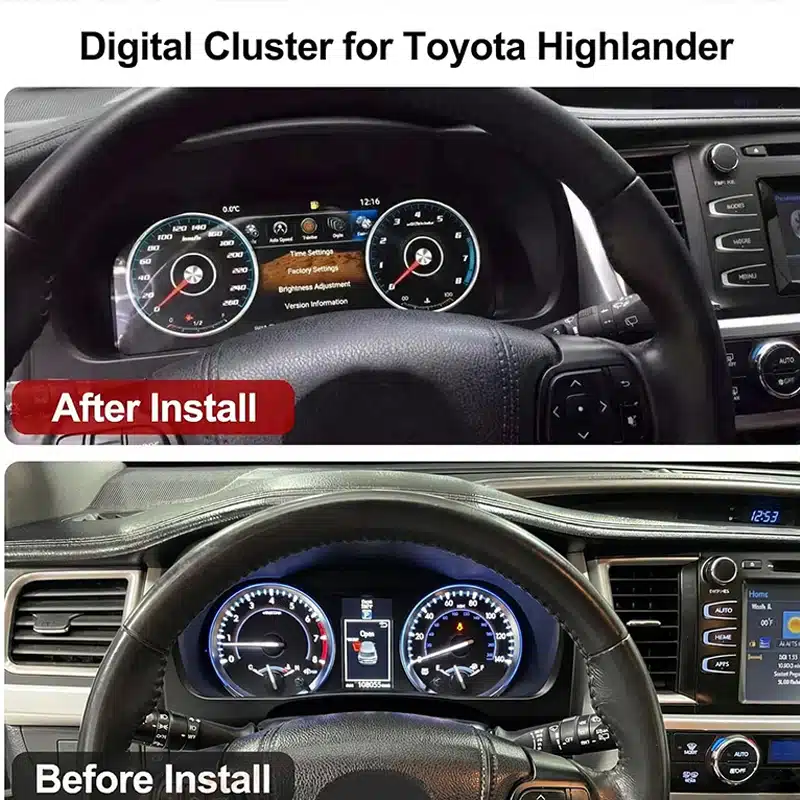
Actualización del salpicadero digital específico para cada modelo de iKAGOO
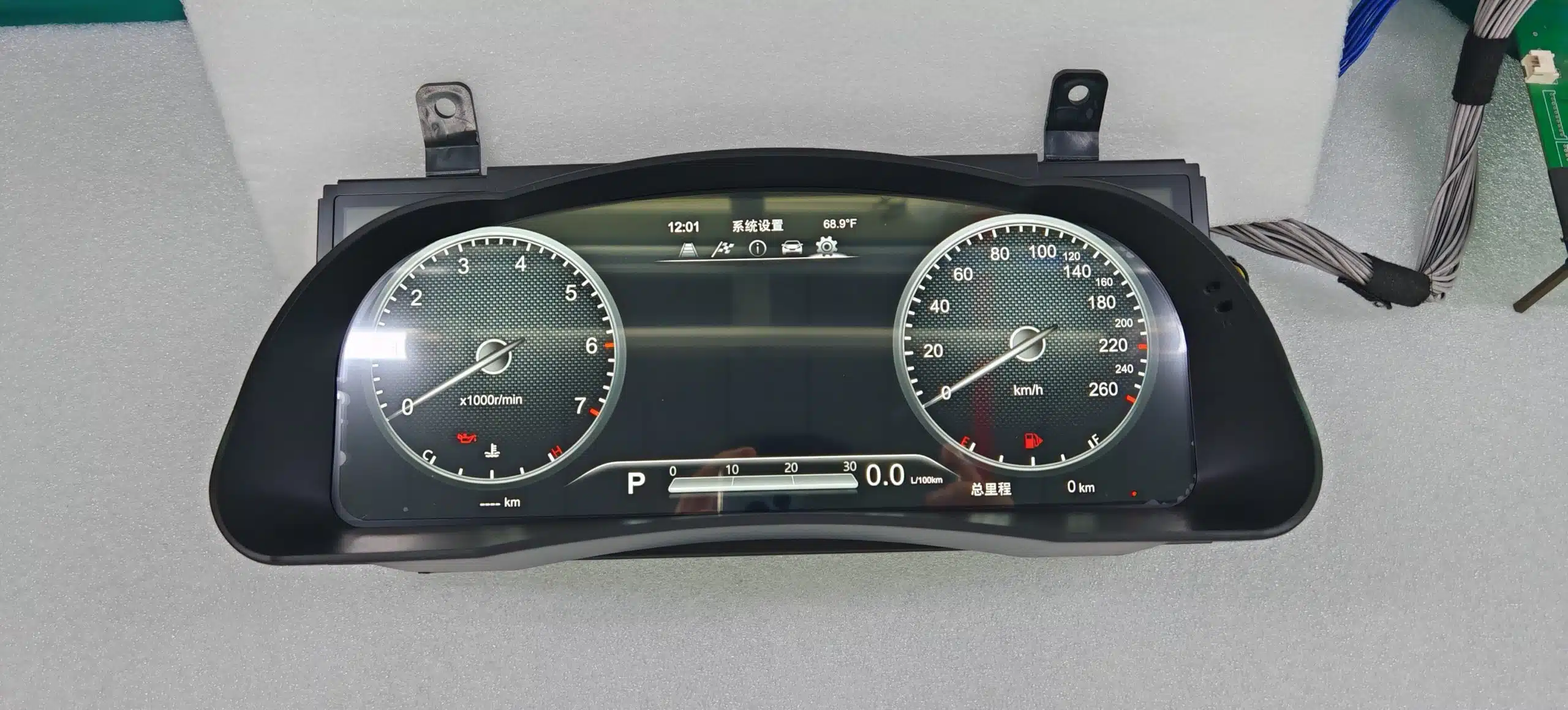
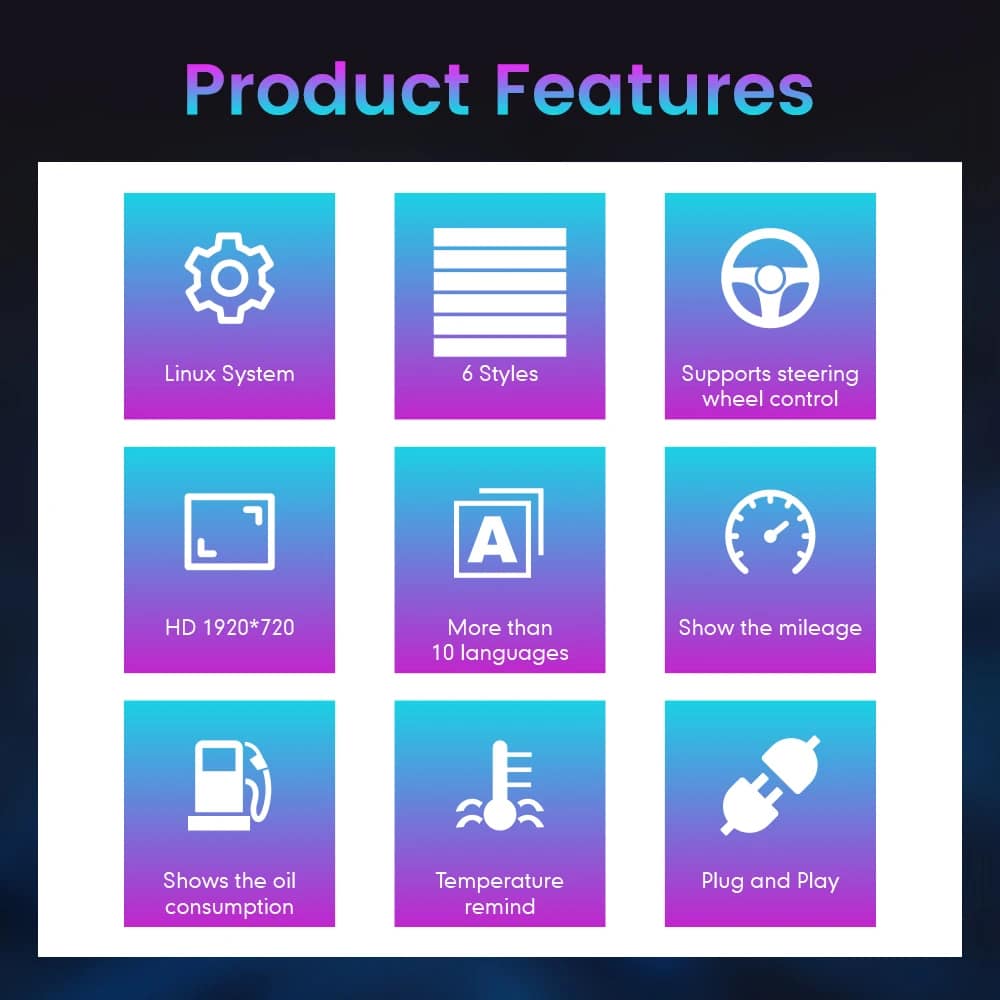
El Cuadro de instrumentos digital del Toyota Highlander sustituye el cuadro de instrumentos tradicional por una amplia pantalla Linux de 12,3 pulgadas con una resolución de 1920×720, lo que confiere a tu Highlander un habitáculo más limpio y moderno, centrado en el conductor.
Consulta la velocidad, las revoluciones por minuto (RPM), el kilometraje, la información del trayecto, los datos de combustible, la presión de los neumáticos y las alertas del vehículo compatibles a través de una interfaz digital clara que resulta más fácil de leer durante la conducción diaria.
Se trata de una actualización completa del cuadro de instrumentos. No sustituye la radio central y no es un módulo exclusivo para CarPlay, lo que te permite modernizar la pantalla del conductor sin tener que cambiar todo el sistema de infoentretenimiento.
Una amplia pantalla de 1920×720 ofrece más espacio para la información de conducción y mejora la visibilidad desde el asiento del conductor.
Consulta la velocidad, las revoluciones por minuto (RPM), el kilometraje, el recorte de viaje, el consumo de combustible, la presión de los neumáticos y la información de advertencias en una pantalla diseñada para el conductor.
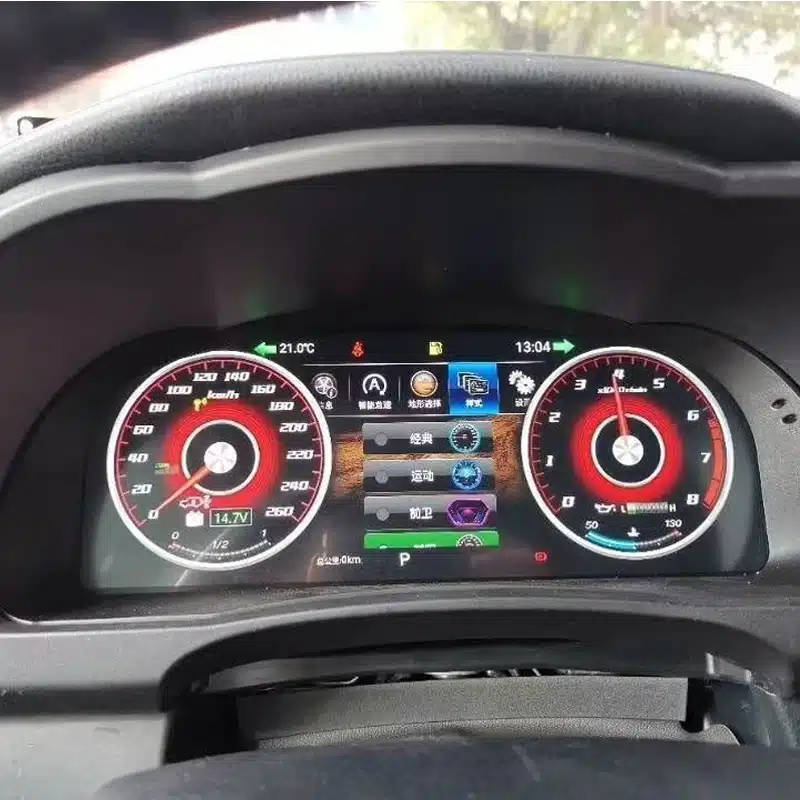
Cambia el aspecto del cuadro de instrumentos para adaptarlo a la conducción diaria, a los viajes, a la información deportiva o al uso todoterreno.
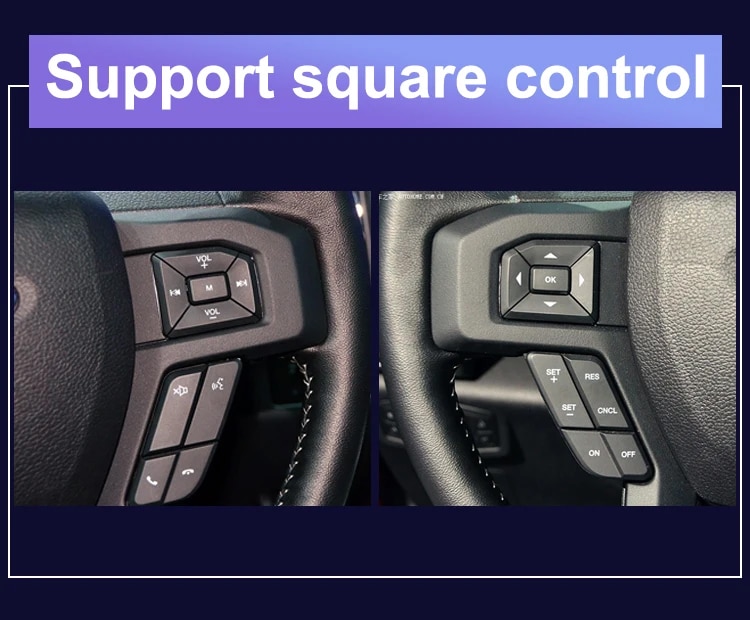
Utiliza los botones originales del volante compatibles para cambiar de página en la pantalla y manejar las funciones compatibles del cuadro de instrumentos.
La carcasa se adapta a la forma del salpicadero del Highlander para ofrecer un aspecto final más limpio e integrado.
iKAGOO comprueba el año de fabricación, el salpicadero, el grupo de instrumentos original, el sistema de propulsión y la configuración regional antes de preparar tu pedido.
Este cuadro de instrumentos digital de 12,3 pulgadas está diseñado para las configuraciones compatibles del Toyota Highlander de los años 2015 a 2019. Supone una importante mejora para los propietarios que desean un velocímetro digital más grande, una mayor visibilidad de la información del vehículo y un entorno de conducción más moderno.
Para preparar la versión adecuada, iKAGOO comprueba el año de fabricación de tu vehículo, la foto del salpicadero, el aspecto original del cuadro de instrumentos, si se trata de un modelo de gasolina o híbrido, la posición del volante y el mercado del vehículo antes del envío. Esto nos ayuda a preparar la pantalla, el cableado y la configuración adecuados para tu pedido.
Valor añadido en el día a día
La principal ventaja no consiste simplemente en sustituir los indicadores mecánicos por una pantalla. Se trata de hacer que la información que utilizas a diario sea más fácil de leer, más fácil de organizar y más agradable de ver.
Los grandes indicadores digitales y gráficos facilitan la lectura de la velocidad y la información del motor sin tener que depender de una pequeña pantalla central de información.
La información sobre el kilometraje, los viajes, el combustible, la autonomía, la presión de los neumáticos y las advertencias puede organizarse en un diseño digital más claro.
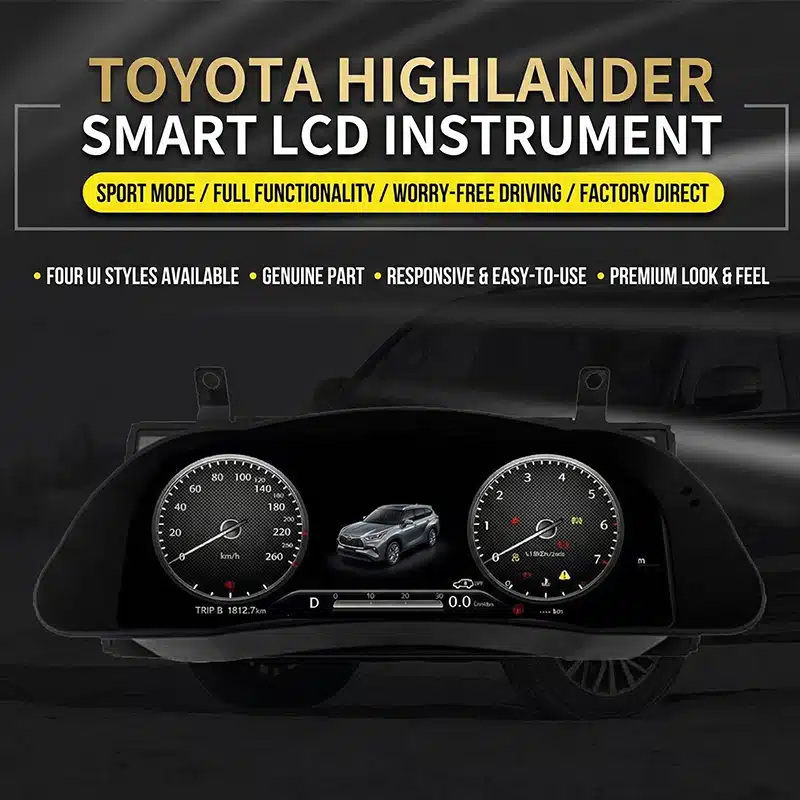
Elige entre los estilos de pantalla disponibles para destacar los indicadores clásicos, la información deportiva, los datos del viaje o una presentación más sencilla para la conducción diaria.
Los botones originales del volante compatibles siguen estando disponibles, por lo que puedes cambiar de página en el cuadro de instrumentos y acceder a la información de conducción de forma más cómoda.
Renueva la parte del interior que tienes justo delante sin tener que cambiar la radio ni sustituir todo el sistema de la consola central.
iKAGOO utiliza la información y las fotos de tu vehículo para ayudarte a preparar la configuración adecuada del cuadro de instrumentos y la solución de conexión más adecuada.
Compatibilidad con las funciones originales del vehículo
Si se utiliza la versión adecuada para el vehículo, el cableado correspondiente y se realiza una instalación correcta, el cuadro de instrumentos está diseñado para seguir mostrando la información compatible que proporciona tu Highlander.
La información sobre la velocidad del vehículo y el régimen del motor sigue mostrándose a través de la nueva interfaz de indicadores digitales.
La información del cuentakilómetros, del cuentakilómetros parcial y del cuentakilómetros total seguirá estando disponible una vez que el cuadro de instrumentos se haya preparado y configurado correctamente.
El nivel de combustible, la información sobre el consumo y la autonomía restante siguen mostrándose para facilitar la planificación de los desplazamientos diarios.
La información sobre la presión de los neumáticos y las advertencias relacionadas con los mismos siguen siendo visibles en la pantalla digital.
Las advertencias relacionadas con el motor, los frenos, los cinturones de seguridad y el estado del vehículo siguen apareciendo tras una instalación correcta.
Los botones originales del volante que son compatibles siguen estando disponibles para manejar las páginas y los ajustes compatibles del cuadro de instrumentos.
Las versiones compatibles permiten seleccionar las unidades de velocidad (MPH o KM/H) y las unidades de temperatura o presión de los neumáticos correspondientes.
La información sobre el sistema ACC y la alerta de salida de carril seguirá mostrándose en los vehículos que vinieran equipados de serie con dichas funciones.
Consulta los detalles de la actualización
Explora la forma del panel de instrumentos, su aspecto en el interior del vehículo y las diferentes configuraciones de interfaz disponibles para comprender cómo la actualización modifica el entorno de conducción del Highlander.


Evaluaciones de compra de iKAGOO
Estas tres evaluaciones de iKAGOO te ayudan a decidir si la actualización se ajusta a tus planes de propiedad, a la configuración de tu vehículo y a tu método de instalación preferido.
Esta actualización ofrece un gran valor añadido en el día a día a los propietarios de un Highlander que tengan previsto conservar el vehículo y deseen disfrutar de una experiencia de información al conductor más clara y moderna.
Quizá no sea tan necesario realizar esta mejora si el cuadro de instrumentos original funciona bien y prefieres mantener el interior totalmente original.
Este producto se evalúa según el marco «iKAGOO Upgrade Necessity», que tiene en cuenta el estado del sistema de fábrica, la mejora del uso diario, el valor a largo plazo de la propiedad, las alternativas disponibles y el valor práctico de la actualización.
Lee el marco de referencia sobre la necesidad de actualizar iKAGOOLa carcasa específica para el Highlander, el recorrido de conexión adaptado y las funciones de datos del vehículo compatibles están diseñadas para que la actualización se integre perfectamente en el vehículo, en lugar de parecer una pantalla añadida por separado.
La calidad de la compatibilidad abarca la instalación física, la información del vehículo, los controles originales, la visualización de avisos, el diseño de la interfaz y la integración general. Esto no significa que se elimine un porcentaje equivalente de las funciones originales.
Este resultado se basa en el marco de compatibilidad con vehículos originales de iKAGOO. Este marco evalúa la continuidad de las funciones de fábrica, los controles originales, la integración de los datos del vehículo y las advertencias, la arquitectura física, la interacción al estilo de fábrica y la integración de la instalación.
El resultado refleja la calidad global de la integración de la actualización. Esto no significa que se pierda o se conserve el mismo porcentaje de funciones de fábrica.
Consulta el marco de compatibilidad de vehículos de iKAGOO OriginalSe recomienda que la instalación la realice un profesional, ya que el trabajo incluye el desmontaje del panel de instrumentos, la conexión de los conectores, la configuración del vehículo y una comprobación completa del funcionamiento de los indicadores de aviso, los datos y la alimentación eléctrica.
Un nivel de instalación más alto refleja la cantidad de trabajo profesional que requiere. No implica una menor calidad del producto, una menor compatibilidad ni un menor valor de actualización.
Este nivel de instalación se asigna según el marco de referencia de dificultad de instalación de iKAGOO Car Electronics. Tiene en cuenta el desmontaje del salpicadero, las conexiones de cableado, el tendido de cables, la configuración del CANBUS, las pruebas de funcionamiento, el comportamiento de la alimentación y el nivel de experiencia que debe tener el instalador.
La dificultad de instalación se refiere al trabajo necesario para llevar a cabo la instalación correctamente. No implica que el producto sea de menor calidad ni que su valor de reventa sea menor.
Lee el marco de referencia sobre la dificultad de instalación de iKAGOOElige la vía de actualización adecuada
Cada solución responde a una necesidad diferente. Esta comparación te ayuda a elegir la opción que mejor se adapte a lo que quieres mejorar en tu Highlander.
| Opción | Qué cambia | Ideal para | Consideración principal |
|---|---|---|---|
| Cuadro de instrumentos digital iKAGOO | Sustituye el conjunto de indicadores original por una pantalla digital completa. | Los propietarios que deseen contar con indicadores modernos, temas personalizables e información de conducción más clara. | Requiere una preparación específica para cada vehículo y una instalación profesional. |
| Reparación del clúster original | Repara el conjunto de instrumentos de fábrica existente. | Propietarios que prefieren mantener el aspecto original y solo necesitan corregir un defecto ya existente. | El módulo reparado conserva su diseño original de pantalla. |
| Cuadro de instrumentos original de segunda mano | Sustituye el cuadro de instrumentos defectuoso por otra unidad del mismo estilo que la original. | Propietarios que puedan conseguir un componente original que coincida exactamente. | Es posible que haya que prestar especial atención al kilometraje, la codificación, las especificaciones y el estado de las piezas. |
| Módulo CarPlay | Añade compatibilidad con la conectividad de teléfonos móviles al sistema de infoentretenimiento central. | Los propietarios buscan principalmente funciones de navegación, música y llamadas en el móvil. | No sustituye ni moderniza el cuadro de instrumentos. |
| Unidad principal Android | Actualiza la pantalla central y el sistema multimedia. | Propietarios que deseen aplicaciones de Android, funciones de navegación y multimedia. | Es un producto distinto de esta pantalla del cuadro de instrumentos. |
Más información sobre el producto
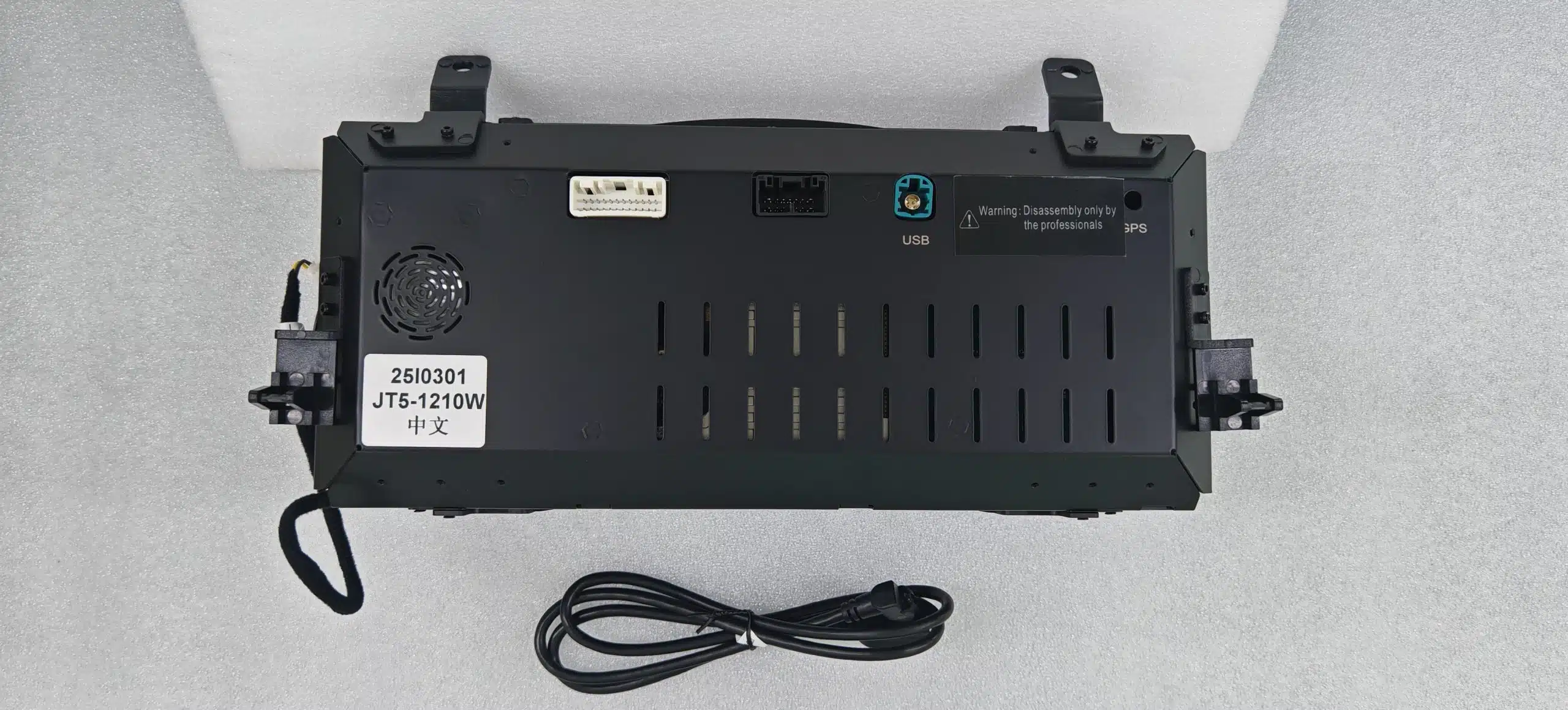
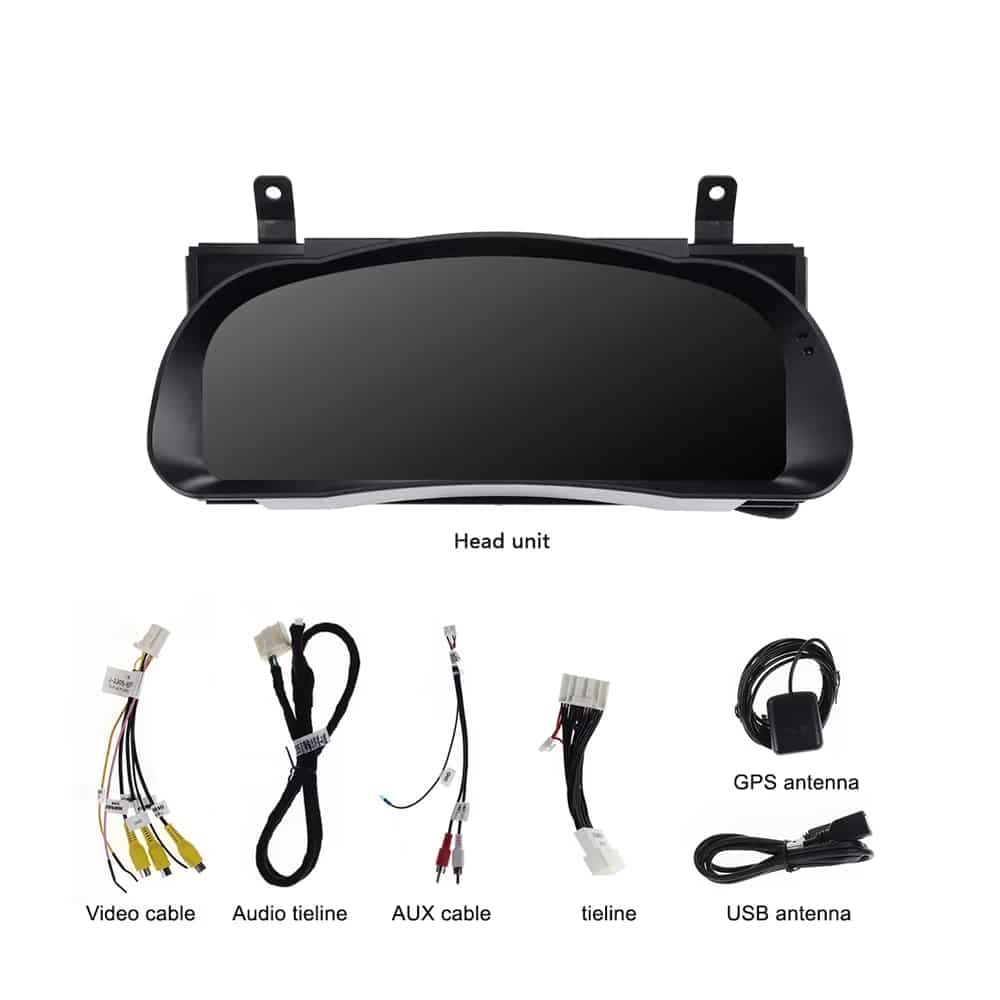
Consulta las opciones de pantalla, el conjunto de instrumentos, las conexiones traseras, el cableado incluido y los ejemplos de mandos en el volante antes de elegir tu configuración.
Especificaciones del producto
Este módulo se centra en la información del vehículo y la pantalla del conductor. No está pensado para sustituir las funciones multimedia de una unidad principal con Android o de un sistema CarPlay.
| Tipo de producto | Cuadro de instrumentos digital completo específico para cada vehículo |
|---|---|
| Aplicación en vehículos | Toyota Highlander, modelos compatibles de 2015 a 2019 |
| Tamaño de pantalla | 12.3-inch |
| Tipo de pantalla | Pantalla digital del cuadro de instrumentos HD QLED |
| Resolución | 1920 × 720 |
| Sistema operativo | Linux |
| Rendimiento de la actualización | Hasta 60 fps |
| Startup | Arranque rápido de Linux diseñado para su uso en instrumentos |
| Temas de pantalla | Seis estilos de interfaz seleccionables |
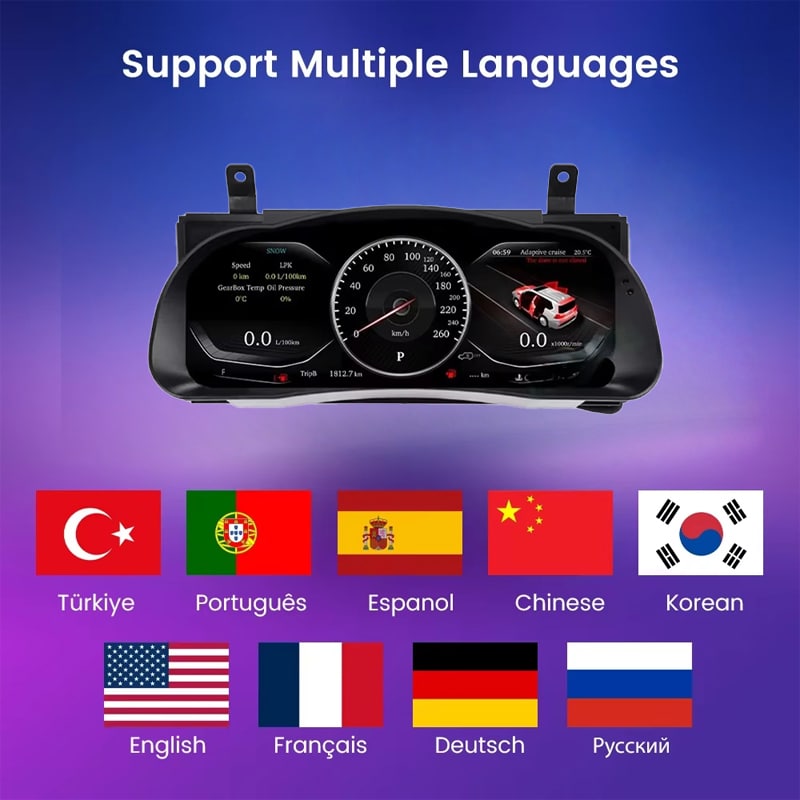
| Idiomas | Más de 10 idiomas disponibles en la interfaz; indica tu idioma preferido al realizar el pedido |
| Información sobre el vehículo | Velocidad, revoluciones por minuto (RPM), kilometraje, recorrido, combustible, autonomía, TPMS e información sobre las alertas del vehículo |
| Unidades | Ajustes de unidades compatibles: MPH/KM/H, temperatura y presión de los neumáticos |
| Controles originales | Funcionamiento compatible con los mandos originales del volante |
| Rango de funcionamiento especificado | de -40 °C a +80 °C |
| Método de conexión | Recorrido de conexión específico para cada vehículo, diseñado para evitar el corte intencionado del cableado principal de fábrica compatible |
| Opciones de año disponibles | Versión 2015-2018 y versión 2018-2019 |
| Peso de envío | 8 kg |
| Dimensiones del paquete | 48 × 38 × 28 cm |
| Enfoque en el producto | Indicadores digitales e información sobre los vehículos compatibles. Las aplicaciones de Android, Apple CarPlay, Android Auto, el sistema de audio DSP, 4G, Wi-Fi y las funciones multimedia de Bluetooth no forman parte de las prestaciones de este producto. |
Selecciona la configuración correcta
El año de fabricación de tu modelo es importante, pero el aspecto original del cuadro de instrumentos, el sistema de propulsión y el mercado del vehículo también ayudan a iKAGOO a preparar la configuración más adecuada.
Selecciona esta opción para aplicar la configuración anterior del instrumento tras confirmar el aspecto original del panel de instrumentos con iKAGOO.
Selecciona esta opción para la configuración posterior del instrumento correspondiente una vez que iKAGOO haya comprobado la disposición original del clúster y del panel de control.
Hardware y conexiones
iKAGOO prepara los accesorios de conexión correspondientes según la información del vehículo confirmada para tu pedido.
La disposición del cableado aplicable puede variar en función del año de fabricación del vehículo, el cuadro de instrumentos original, la configuración (gasolina o híbrida) y el mercado en el que se comercialice el vehículo. iKAGOO prepara la solución de conexión tras comprobar los datos de tu vehículo.
Preparación de vehículos iKAGOO
Con unos pocos datos claros sobre el vehículo, iKAGOO puede preparar la pantalla, el cableado y la configuración adecuados antes de que se envíe tu pedido.
Indica el año exacto del modelo, sobre todo al realizar un pedido para un Highlander de 2018.
Envía una foto amplia en la que se vean el volante, el cuadro de instrumentos original y el salpicadero que lo rodea.
Envía una imagen clara de la vista frontal en la que se aprecie la disposición original de los indicadores y la pantalla central de información.
Especifique el sistema de propulsión para que se pueda preparar la interfaz adecuada de revoluciones por minuto, combustible o energía.
Indique el país, las especificaciones de EE. UU. cuando proceda, y si el vehículo tiene el volante a la izquierda o a la derecha.
Cuéntanos sobre los conjuntos de recambio, los cambios en el cableado, las alarmas u otros componentes electrónicos de recambio para el vehículo.
Planificación de la instalación
Una instalación correcta implica algo más que conectar el cuadro de instrumentos. El instalador también debe comprobar los datos del vehículo que se muestran en la pantalla, la información de advertencia, los mandos de la dirección y el comportamiento del sistema cuando se apaga.
Haz fotos del kilometraje original, las advertencias, las unidades, el nivel de combustible, el salpicadero y el cuadro de instrumentos antes de proceder al desmontaje.
Utiliza herramientas adecuadas para el acabado y protege el salpicadero, la columna de dirección y las superficies interiores circundantes.
Desconecta correctamente la alimentación eléctrica del vehículo y retira el conjunto de instrumentos original sin tirar ni retorcer los conectores de fábrica.
Comprueba que cada conexión coincida con la forma del conector, la ranura de fijación y las instrucciones proporcionadas. Nunca fuerces la inserción de un conector en una toma que no sea compatible.
Confirma si es de gasolina o híbrido, las unidades, el idioma, el control en el volante y los ajustes correspondientes de los datos del vehículo.
Comprueba la velocidad, las revoluciones por minuto (RPM), el kilometraje, la información del viaje, el combustible, el sistema TPMS, las luces de aviso, los mandos de la dirección y la información sobre los sistemas de seguridad de que dispone el vehículo.
Apague y bloquee el vehículo; a continuación, compruebe que el cuadro de instrumentos siga el comportamiento previsto de apagado y modo de reposo.
Vuelva a instalar el embellecedor solo después de haber comprobado la información necesaria sobre el vehículo, las advertencias, los mandos y el comportamiento del sistema eléctrico.
Detener el proceso en este punto ayuda a proteger el vehículo, el cableado de fábrica y el nuevo cuadro de instrumentos mientras iKAGOO proporciona las instrucciones adecuadas para la conexión.
Asistencia en la compra y posventa
Tu pedido incluye algo más que la pantalla. iKAGOO también te ayuda a preparar la configuración del vehículo y te presta asistencia en la instalación y el proceso de posventa.
El año de fabricación de tu vehículo, el salpicadero, el cuadro de instrumentos original, el sistema de propulsión y los datos regionales se tienen en cuenta para preparar la versión adecuada.
El pedido se envía mediante una vía de seguimiento disponible una vez que se haya preparado la información del vehículo y la configuración del producto.
Los fallos de hardware verificados que cumplan los requisitos se gestionan en virtud de la actual garantía limitada de hardware de iKAGOO.
iKAGOO puede ayudar a revisar las fotos de las conexiones, la configuración del vehículo y la información de las pruebas de funcionamiento cuando se necesite ayuda con la instalación.
Por favor, facilite los datos exactos del vehículo y las fotos solicitadas antes de la compra para que iKAGOO pueda preparar la versión adecuada. La información incorrecta sobre el vehículo, las modificaciones no comunicadas o las limitaciones del sistema del vehículo no se consideran motivos válidos para una devolución y un reembolso incondicionales.
Cuando iKAGOO confirme la compatibilidad antes de la compra, la información del vehículo sea correcta y el cliente colabore de forma razonable en la resolución de problemas de instalación, cualquier error de compatibilidad confirmado por iKAGOO se gestionará de acuerdo con la Política de devoluciones y reembolsos vigente.
El envío opcional con DDP o con impuestos incluidos solo se aplica cuando así se indica o se confirma específicamente para el destino y el pedido en cuestión.
Política de envíos • Política de garantía • Política de devoluciones y reembolsos • Guía DDP
Preguntas frecuentes sobre el cuadro de instrumentos digital Highlander
Las versiones disponibles están diseñadas para las configuraciones compatibles del Toyota Highlander de los años 2015 a 2019. iKAGOO comprueba el año, el cuadro de instrumentos original, si se trata de una configuración de gasolina o híbrida, el mercado del vehículo, la posición del volante y las fotos del salpicadero antes de preparar el pedido.
Seleccione entre las versiones 2015-2018 y 2018-2019 según la configuración original del instrumento confirmada por iKAGOO. Los propietarios de vehículos de 2018 deben facilitar fotografías del salpicadero y del cuadro de instrumentos original para que se pueda identificar la versión correcta.
Se trata de un cuadro de instrumentos digital que sustituye por completo al original. Mejora la pantalla de los indicadores del conductor, pero no añade CarPlay a la radio central.
Los botones originales del volante compatibles siguen funcionando con las páginas y ajustes compatibles del cuadro de instrumentos una vez que se ha preparado y configurado la versión correcta del vehículo.
El módulo emparejado está diseñado para mostrar la información sobre el kilometraje del vehículo compatible tras una preparación y configuración correctas. Anote la lectura original del cuentakilómetros antes de la instalación y compruebe la información mostrada antes del montaje final.
La información del TPMS compatible y los indicadores de advertencia del vehículo siguen mostrándose a través de la conexión con los datos del vehículo correspondientes. El instalador debe comprobar todos los indicadores de advertencia y de estado necesarios antes de finalizar la instalación.
Este producto sustituye al cuadro de instrumentos, y no al sistema de infoentretenimiento central. La cámara de marcha atrás, la radio, el amplificador y los altavoces originales siguen formando parte del sistema actual del vehículo.
Los vehículos de gasolina e híbridos tienen requisitos diferentes en cuanto a la información de conducción. Indica el tipo exacto de sistema de propulsión antes del envío para que iKAGOO pueda preparar la pantalla y la configuración del vehículo adecuadas.
La ruta de conexión adaptada está diseñada para evitar tener que cortar intencionadamente el cableado principal de fábrica. Si un conector no encaja o la instalación parece requerir cortar el mazo de cables principal, deténgase y póngase en contacto con iKAGOO para recibir orientación.
Se recomienda que la instalación la realice un profesional. El trabajo incluye la retirada de los embellecedores del salpicadero, la sustitución de los instrumentos, la manipulación de los conectores, la configuración del vehículo y la realización de pruebas completas de las luces de aviso, los datos y el comportamiento del sistema eléctrico.
Tras la instalación, apaga y bloquea el vehículo y comprueba que el cuadro de instrumentos se apague y entre en el estado de reposo previsto. Si sigue encendido, se reinicia repetidamente o se activa de forma inesperada, interrumpe la instalación y ponte en contacto con iKAGOO.
El paquete incluye el cuadro de instrumentos digital y los accesorios de conexión correspondientes, adaptados a la versión del vehículo confirmada. Las imágenes del producto muestran un cable de vídeo, un cable de conexión de audio, un cable AUX, un cable de conexión principal, una antena GPS y un cable USB.
El hardware que cumpla los requisitos está cubierto por la garantía limitada de hardware de iKAGOO, de 12 meses de duración, a partir de la fecha de entrega confirmada. El servicio de asistencia para la instalación, la configuración y la resolución de problemas está disponible de acuerdo con las condiciones aplicables del producto y de la póliza.
Envía el año exacto, una foto del salpicadero, una foto del cuadro de instrumentos original, la configuración (gasolina o híbrida), el país o el mercado del vehículo, la información sobre si el volante está a la izquierda o a la derecha y los detalles de cualquier modificación previa.
iKAGOO compara el año de fabricación de tu vehículo, el aspecto original del cuadro de instrumentos, la estructura del salpicadero, el sistema de propulsión, la configuración regional y la posición del volante con el cuadro de instrumentos y la solución de cableado disponibles antes de preparar el pedido.
Infórmate antes de comprar
Selecciona la configuración de tu modelo en la sección de compras y facilítanos la foto del salpicadero, la foto del cuadro de instrumentos original, así como la información sobre el sistema de propulsión y el mercado del vehículo. iKAGOO utilizará esos datos para preparar la pantalla, el cableado y la configuración adecuados para tu pedido.
Toyota y Highlander son marcas registradas de sus respectivos propietarios. iKAGOO es un proveedor independiente de productos electrónicos específicos para vehículos del mercado de recambios y no está afiliado a Toyota Motor Corporation.
Debes estar logueado para publicar una opinión.


Información clara sobre compatibilidad del vehículo, preparación del pedido, entrega internacional, garantía, devoluciones y soporte posventa.
Los componentes electrónicos específicos del vehículo requieren la versión, el cableado y la configuración correctos. Nuestro proceso está diseñado para reducir problemas evitables de compatibilidad e instalación.
El modelo del vehículo, el año, el sistema original y la información de configuración relevante pueden revisarse antes de la compra para reducir el riesgo de seleccionar la versión incorrecta.
Antes del envío, el pedido se verifica con la información confirmada del vehículo, de modo que se prepare la versión, configuración y los componentes específicos necesarios para el vehículo.
Nuestro objetivo es preparar tu pedido correctamente antes de que salga de nuestras instalaciones. Verificamos la compatibilidad, preparamos la configuración correcta y le contactamos solo si algo aún necesita confirmación.
Un resumen práctico de los términos principales que se aplican a pedidos específicos para vehículos iKAGOO.
La mayoría de los pedidos iKAGOO se envían desde nuestra ubicación de cumplimiento en China después de que se hayan verificado la configuración del producto y la información del vehículo.
El procesamiento normal de pedidos es de aproximadamente 1–3 días hábiles. La entrega estimada después del envío es generalmente:
El despacho de aduanas, los días festivos, el clima, los retrasos del transportista y la entrega en zonas remotas pueden afectar estas estimaciones.
El envío internacional estándar normalmente no incluye el IVA del país de destino, los derechos de importación, los cargos de corretaje o las tasas de despacho de aduanas.
Para destinos elegibles de la Unión Europea, El envío DDP puede estar disponible. Los cargos relacionados con la importación se incluyen solo cuando se selecciona DDP al finalizar la compra o se confirma por escrito por iKAGOO antes del envío.
Cuando no se selecciona DDP, los cargos recaudados por la aduana local o el transportista de entrega son normalmente responsabilidad del destinatario.
El envío express o acelerado puede estar disponible para ciertos productos y destinos. La disponibilidad, el transportista y cualquier costo adicional se confirman antes del envío.
Según la ruta y el tipo de producto, iKAGOO puede utilizar DHL, FedEx, UPS, EMS, 4PX u otro proveedor de logística con seguimiento.
Después del envío, el número de seguimiento o el enlace de seguimiento se envía normalmente a la dirección de correo electrónico utilizada para el pedido. Las actualizaciones de seguimiento pueden tardar varios días hábiles en aparecer durante las transferencias de transportistas internacionales.
La elegibilidad para la devolución depende del motivo de la devolución, el estado del producto, el estado de instalación, la evidencia de respaldo y si la devolución ha sido aprobada por iKAGOO.
Para una devolución aprobada sin defectos, el producto normalmente debe permanecer sin usar, sin instalar, completo y apto para la reventa. El cliente es generalmente responsable de los gastos de envío de la devolución aprobada.
Los gastos de envío originales, DDP, IVA, aranceles aduaneros y otros costes logísticos generalmente no son reembolsables, salvo que la ley lo exija o que iKAGOO lo confirme de otro modo.
No envíe un producto de vuelta antes de recibir una dirección de devolución aprobada e instrucciones de devolución de iKAGOO.
Se puede aplicar protección adicional cuando iKAGOO haya revisado la compatibilidad del vehículo, el cliente haya proporcionado información precisa del vehículo y se hayan completado pasos razonables de instalación y diagnóstico.
Si iKAGOO confirma que no hay una solución técnica razonable disponible y el problema se informa dentro de 7 días naturales tras la entrega, el cliente puede ser elegible para un reembolso del precio del producto sin que se le exija devolver el producto.
El envío original, DDP, IVA, aranceles aduaneros y otros cargos de terceros no están incluidos en este reembolso del precio del producto.
Los productos elegibles incluyen una Garantía limitada de hardware de 12 meses que cubren defectos de fabricación verificados y fallos de hardware elegibles en condiciones de uso normal.
Dependiendo del problema verificado, el soporte puede incluir diagnóstico remoto, asistencia de configuración, piezas de repuesto, reparación, reemplazo, reembolso parcial o reembolso completo.
La inspección o el examen de un tercero no anula automáticamente toda la garantía. Sin embargo, los daños causados por reparación no autorizada, modificación incorrecta, circuitos rotos, ensamblaje incorrecto, cableado incorrecto, impacto, entrada de agua o mal uso no suelen estar cubiertos.
Contacte con iKAGOO antes de desmontar, modificar o reparar\r\n el producto para poder proporcionar el procedimiento de diagnóstico correcto.
Ponte en contacto con iKAGOO en un plazo de 7 días naturales tras la entrega y conserve el embalaje original, la etiqueta de envío, los accesorios\r\n y el producto.
Por favor, envía fotos o vídeos nítidos en los que se vea:
Tras la verificación, iKAGOO puede organizar el envío de piezas faltantes,\r\n un reemplazo, reparación, reembolso u otra solución razonable.
Contacte con iKAGOO lo antes posible y antes de la instalación.\r\n Para cambios de dirección, configuración del vehículo o de producto, póngase\r\n en contacto con nosotros preferiblemente dentro de 12 horas después de realizar el pedido.
Se puede aprobar un cambio o devolución cuando un producto seleccionado\r\n incorrectamente permanezca sin usar, sin instalar, completo y\r\n apto para la reventa. Los clientes son normalmente responsables de\r\n los costes de envío y diferencias de precio correspondientes.
Los productos específicos para vehículos pueden entrar en adquisición, programación, prueba o configuración poco después del pago. Una vez que la preparación o el envío haya comenzado, la cancelación puede dejar de ser posible, o se pueden deducir los costes razonables ya incurridos.
El contenido del paquete varía según el producto, el modelo de vehículo, el sistema de fábrica y la configuración seleccionada.
Según el producto, el paquete puede incluir el dispositivo principal, arneses de cableado específicos para el vehículo, interfaz CANBUS, adaptadores, cables USB, antenas, micrófonos, herrajes de montaje u otros accesorios de instalación necesarios.
Consulte las fotos del producto correspondientes, las especificaciones y la confirmación del pedido para conocer el contenido exacto de su pedido.
Puede contactar con iKAGOO a través del formulario de contacto del sitio web, WhatsApp u otros canales de soporte disponibles. El tiempo de respuesta habitual es de 24 horas laborables.
Para un diagnóstico técnico más rápido, incluya su número de pedido, el modelo y año del vehículo, fotos relevantes del sistema de fábrica, fotos del producto y un vídeo claro que muestre el problema.
Los pagos se procesan mediante los métodos de pago seguros que se muestran durante el pago.
Las opciones de tarjeta, monedero y plazos disponibles pueden variar según el país, la moneda, el proveedor de pagos y la elegibilidad del cliente.
Los servicios de pago a plazos, incluidas las opciones ofrecidas por PayPal u otro proveedor de pagos, están sujetos a la disponibilidad regional y a los requisitos de aprobación de dicho proveedor.
Esta sección es una guía simplificada para el cliente. Las páginas completas de la política publicada, la confirmación del pedido y la ley de consumo aplicable tienen prioridad si cualquier redacción difiere.
$780.00 El precio original era: $780.00.$680.00El precio actual es: $680.00.
El envío final se confirma desde tu dirección de entrega al finalizar la compra.

Seleccione lo que desea comprar. Sólo mostramos los detalles necesarios para ese producto.
Revisaremos los detalles y le enviaremos la recomendada a su correo electrónico.
Usamos cookies esenciales para mantener el sitio seguro y funcionando correctamente. Con su consentimiento, también podemos usar cookies analíticas para mejorar la experiencia de navegación. Vea nuestra Política de privacidad.




Colin Mercer -
Lo que más me interesaba era saber cómo se comportaría el sistema durante los arranques matutinos en frío. Hasta ahora, se inicia rápidamente y la pantalla se mantiene nítida aunque el habitáculo aún esté frío. La información sobre la presión de los neumáticos resulta especialmente útil ante los cambios de temperatura en invierno. Me llevó varios viajes decidir qué disposición me gustaba más, pero la interfaz es fácil de entender una vez configurados los ajustes básicos.