


Guía de instalación del cuadro de instrumentos digital 5N para el VW Tiguan (2009-2017): 11 pasos prácticos, montaje y funciones de serie
Guía de instalación del cuadro de instrumentos digital VW Tiguan 5N muestra lo que importa antes de comprar y antes de cerrar el salpicadero: la secuencia exacta de instalación física, la información de fábrica que permanece en la ruta emparejada, la visualización de mapas de CarPlay / Android Auto y la verificación de ajuste previa al envío de iKAGOO.
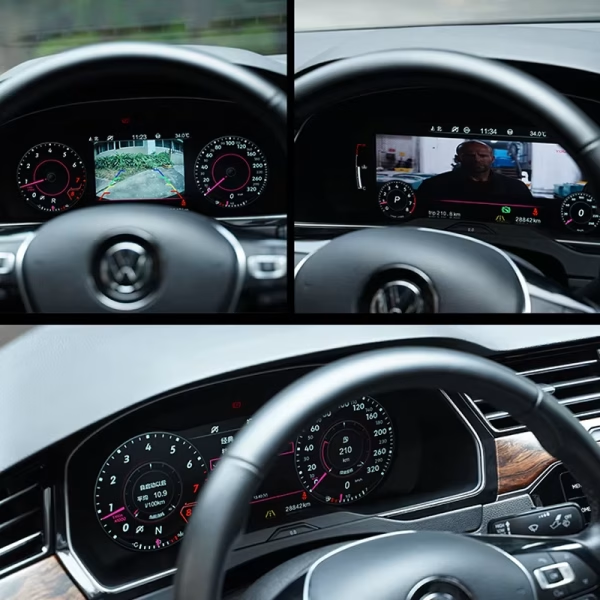
¿Qué cambia tras la actualización del cuadro de instrumentos digital del Tiguan 5N?
El valor principal es una vista más limpia para el conductor sin renunciar a la información del vehículo en la que aún confía. La ruta combinada combina un cuadro de instrumentos moderno de 12.3 pulgadas con datos de fábrica compatibles y visualización de teléfono/mapa más cerca del conductor. Si está comparando esta ruta con otras aplicaciones de VW, explore la gama de cuadros de instrumentos digitales de Volkswagen por modelo en lugar de asumir que un cuadro se adapta a todos los salpicaderos.
La velocidad, las RPM, el combustible, la marcha, el kilometraje, la temperatura y las advertencias compatibles permanecen en la pantalla del conductor.
El funcionamiento del volante multifunción compatible sigue siendo familiar tras una correcta sincronización.
La información de navegación o de proyección del teléfono puede mostrarse a través del controlador compatible o de la ruta sincronizada.
La carcasa dedicada mantiene el cuadro de instrumentos en la posición original del tablero, en lugar de añadir una tableta encima.
La diferencia no es solo la pantalla. Es cómo la versión correcta llega a tu coche.
Los componentes electrónicos específicos del vehículo pueden parecer idénticos en línea, aunque utilicen diferentes carcasas de clúster, conectores o rutas de componentes conservados. iKAGOO simplifica el proceso de compra, añade otra verificación específica del vehículo antes del envío y continúa ofreciendo soporte después de la entrega. El Resumen de protección al comprador de iKAGOO explica cómo encajan la compatibilidad, la entrega y las responsabilidades de posventa.
Compare la ruta del vehículo indicada con su año, clúster original y salpicadero. Pida ayuda antes de finalizar la compra solo si lo desea.
Después de realizar el pedido, iKAGOO vuelve a comprobar la información del vehículo/versión necesaria para preparar la ruta correcta del clúster.
El cuerpo del clúster emparejado, los accesorios y la ruta requerida se preparan antes del empaquetado, en lugar de enviar primero una unidad genérica.
Si el instalador encuentra una discrepancia o un problema de función compatible, se pueden revisar fotos/vídeo antes de modificar el cableado o devolver el producto.
¿Encaja en todos los VW Tiguan de 2009–2017?
No—el año por sí solo no es suficiente. La ruta de producto actual es para vehículos seleccionados Tiguan Mk1 / Tiguan 1 / Type 5N / 5N Facelift. El listado del producto cubre vehículos seleccionados 2009–2017; la fuente detallada del taller a continuación está etiquetada como 2010–2017. Un Tiguan MQB posterior 2017–2022 utiliza un tablero de instrumentos y una ruta de instalación diferentes, por lo que no debe emparejarse con esta guía 5N.
Para conocer el significado de las luces de advertencia de fábrica o la información de referencia específica del vehículo, utilice el servicio oficial de Volkswagen de consulta del manual del propietario con el VIN del vehículo.
Guía de instalación del cuadro digital VW Tiguan 5N: observe primero la ruta física

Las 11 imágenes a continuación provienen de la fuente verificada del taller Tiguan PQ y están agrupadas por la secuencia real de trabajo: desmontar, abrir, reconstruir y reinstalar. Para otro vehículo VW o Audi, utilice la guía de instalación del cuadro de instrumentos digital modelo por modelo en lugar de transferir estos pasos a un salpicadero diferente.
Secuencia de instalación completa del cuadro de instrumentos digital del VW Tiguan 5N
Coloque el cuadro de instrumentos original sobre un banco protegido
Prepare las herramientas, libere las fijaciones inferiores y abra la carcasa solo después de que el cuadro de instrumentos esté fuera del vehículo.
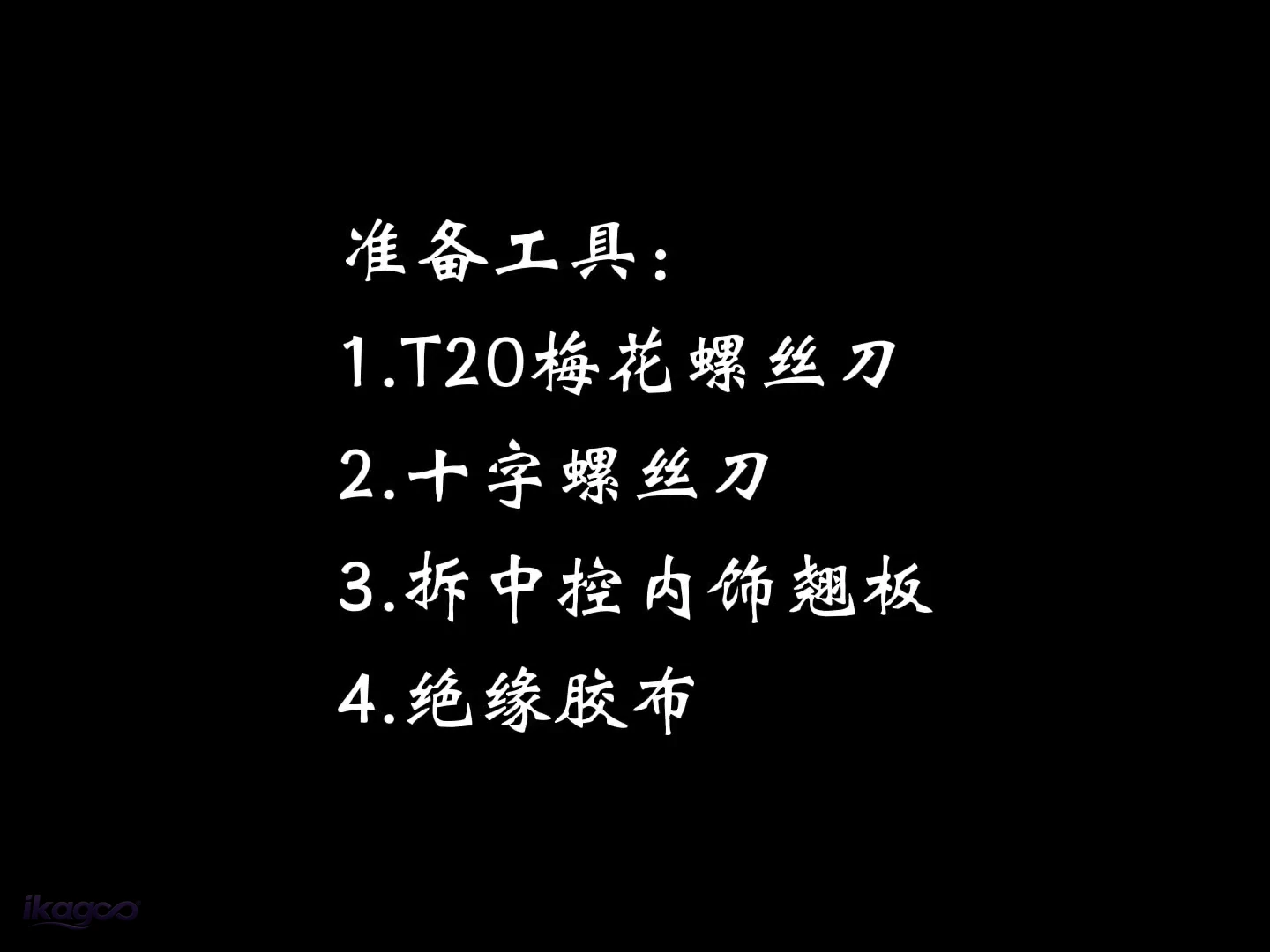 PASO 01
Prepare las cuatro herramientas
Destornillador Torx T20, destornillador de cruz, herramienta de palanca para molduras interiores y cinta aislante eléctrica.
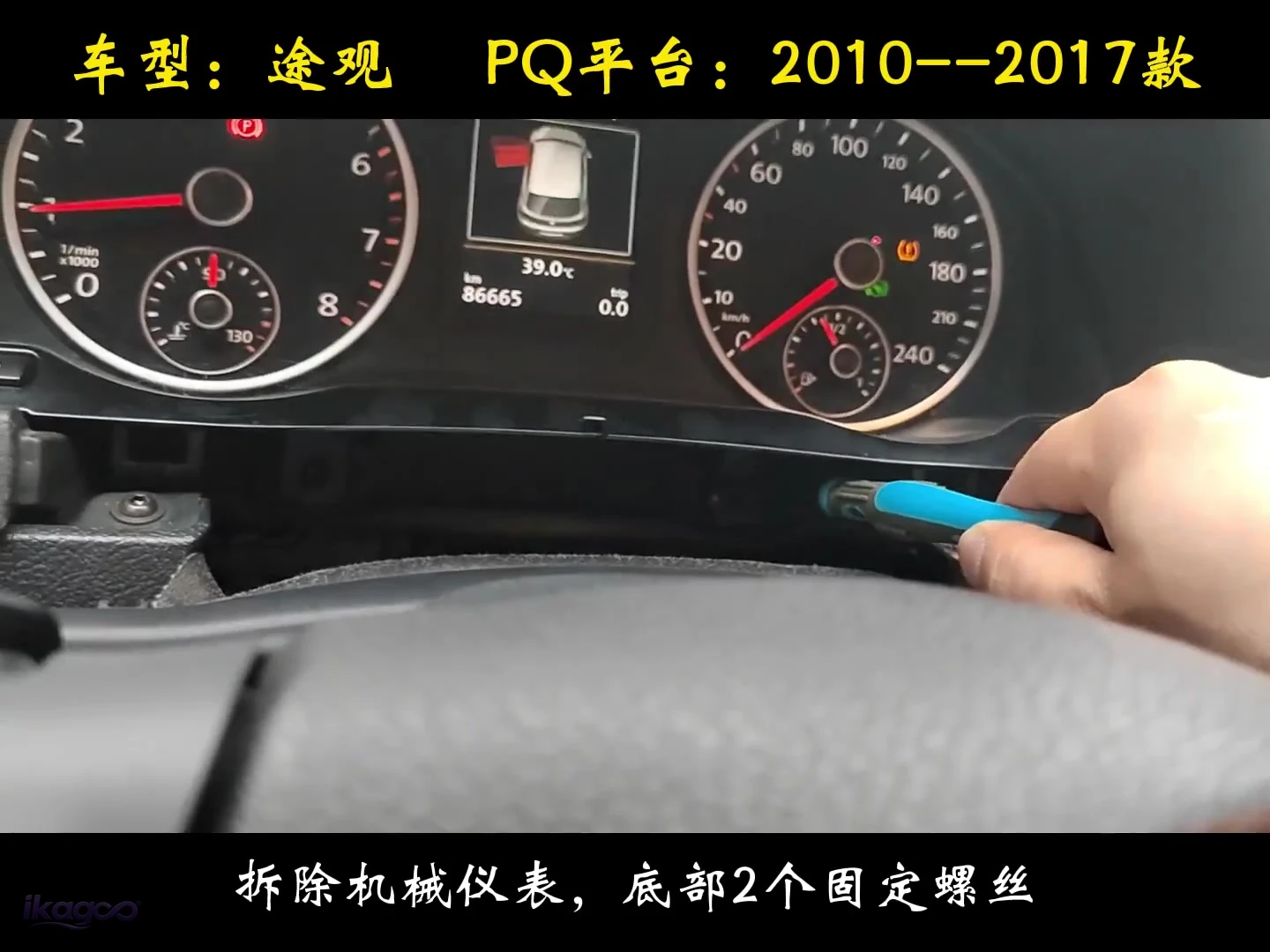 PASO 02
Retire los dos tornillos inferiores del cuadro
Suelte los dos puntos de fijación inferiores y extraiga con cuidado el cuadro de instrumentos original del salpicadero.
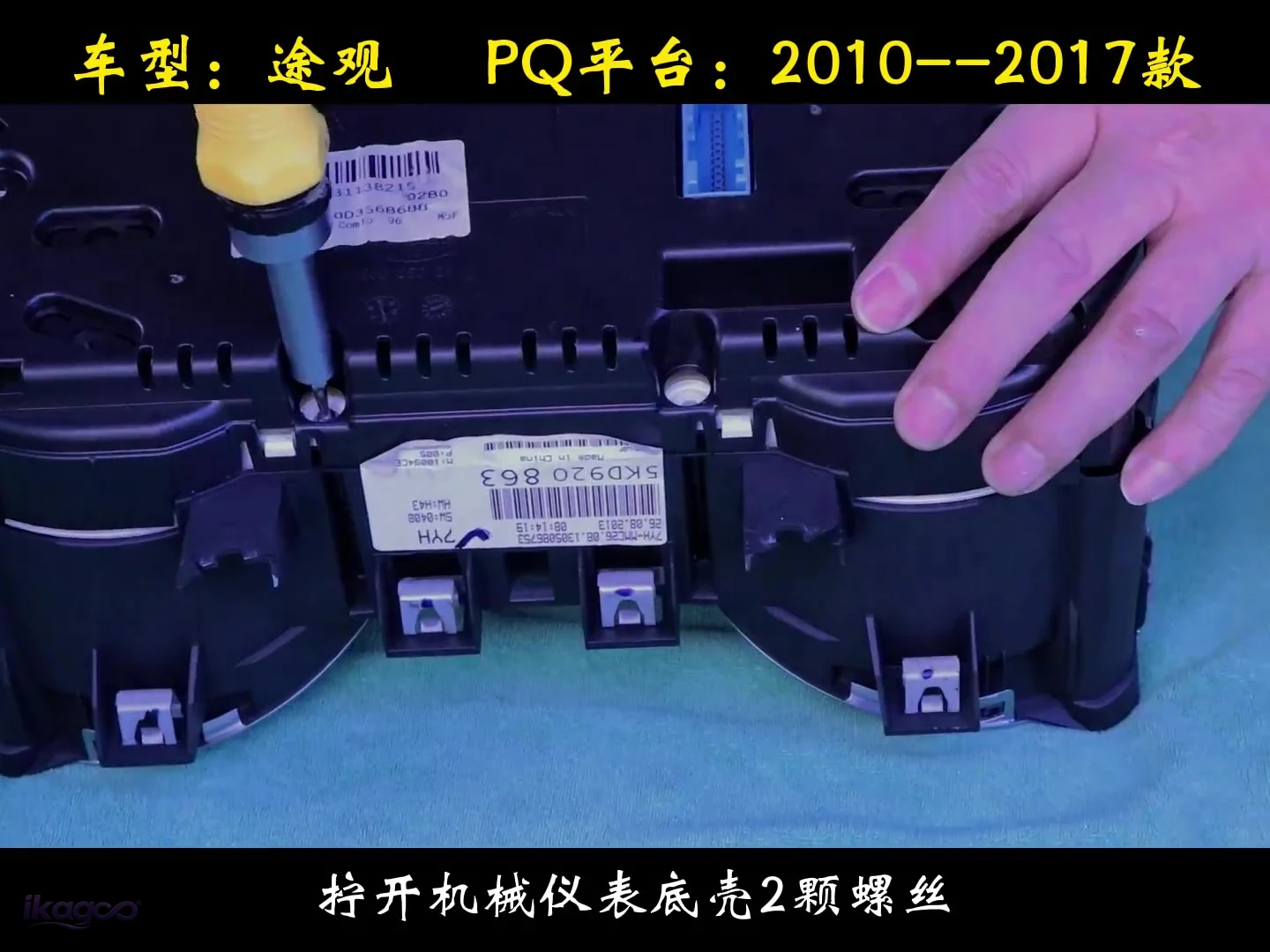 PASO 03
Retire los dos tornillos de la carcasa
Coloque el cuadro extraído sobre un banco protegido y afloje los dos tornillos de la carcasa antes de abrir el conjunto.
Separe con cuidado la estructura del cuadro de instrumentos de fábrica
Esta es la parte más delicada de la instalación y la razón principal por la que el trabajo está clasificado como L3 en lugar de un simple cambio de pantalla.
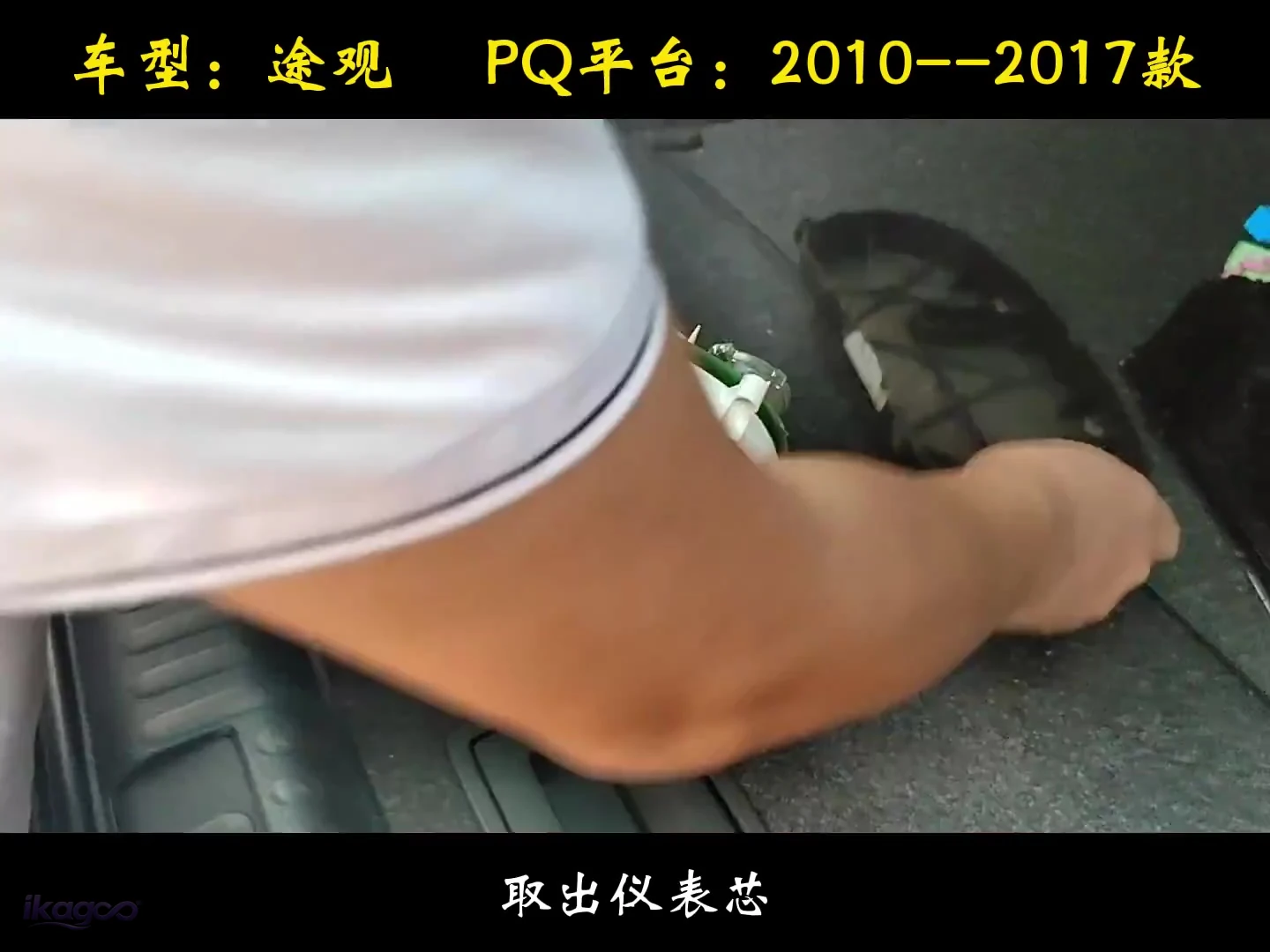 PASO 04
Extraiga el núcleo original del cuadro de instrumentos
Retire el núcleo original para que la esfera y la estructura de la placa de circuito impreso (PCB) puedan manipularse limpiamente en el banco de trabajo.
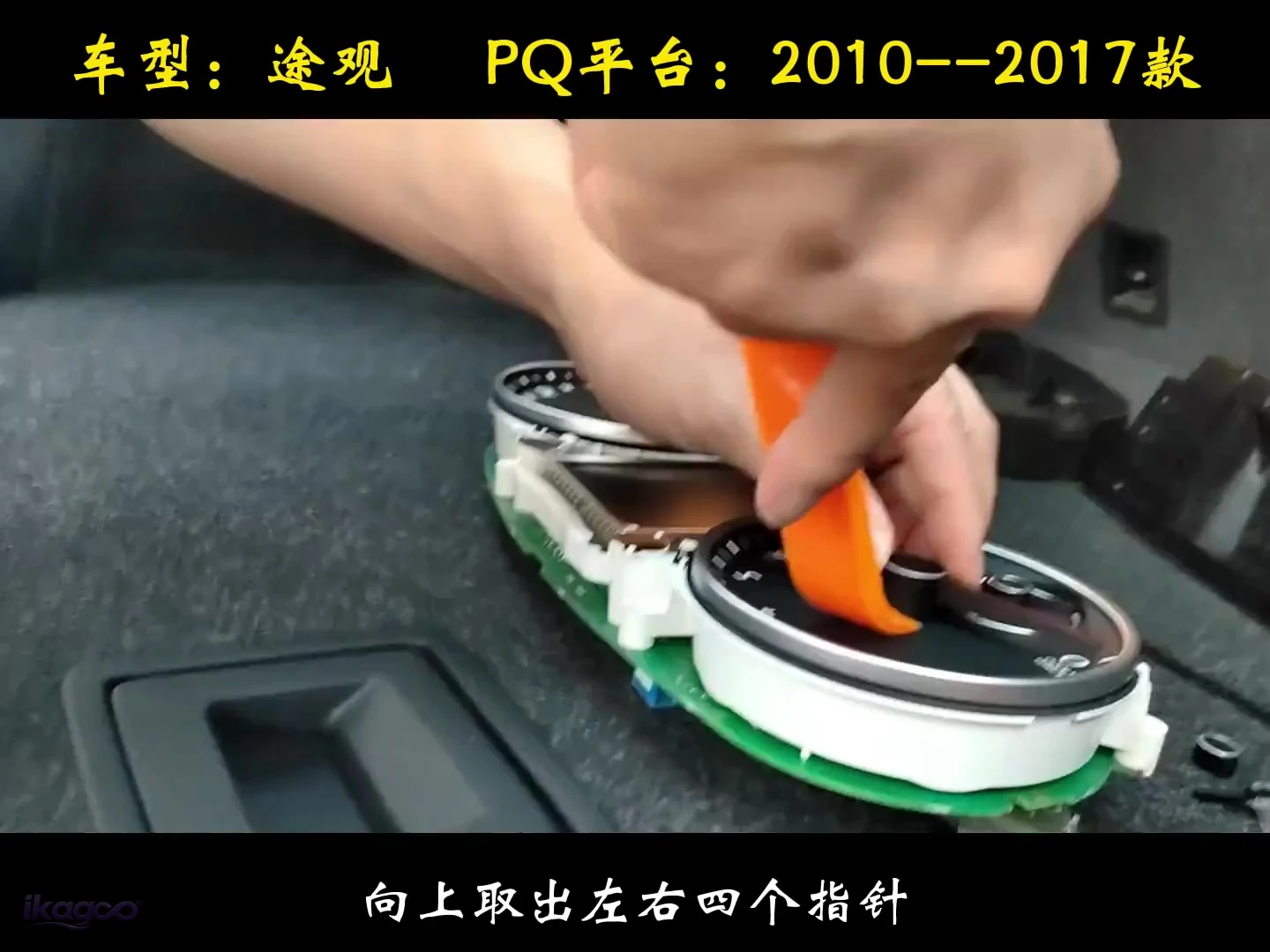 PASO 05
Tire de las cuatro agujas hacia arriba
Retire las cuatro agujas del instrumento verticalmente antes de quitar la placa decorativa de la esfera.
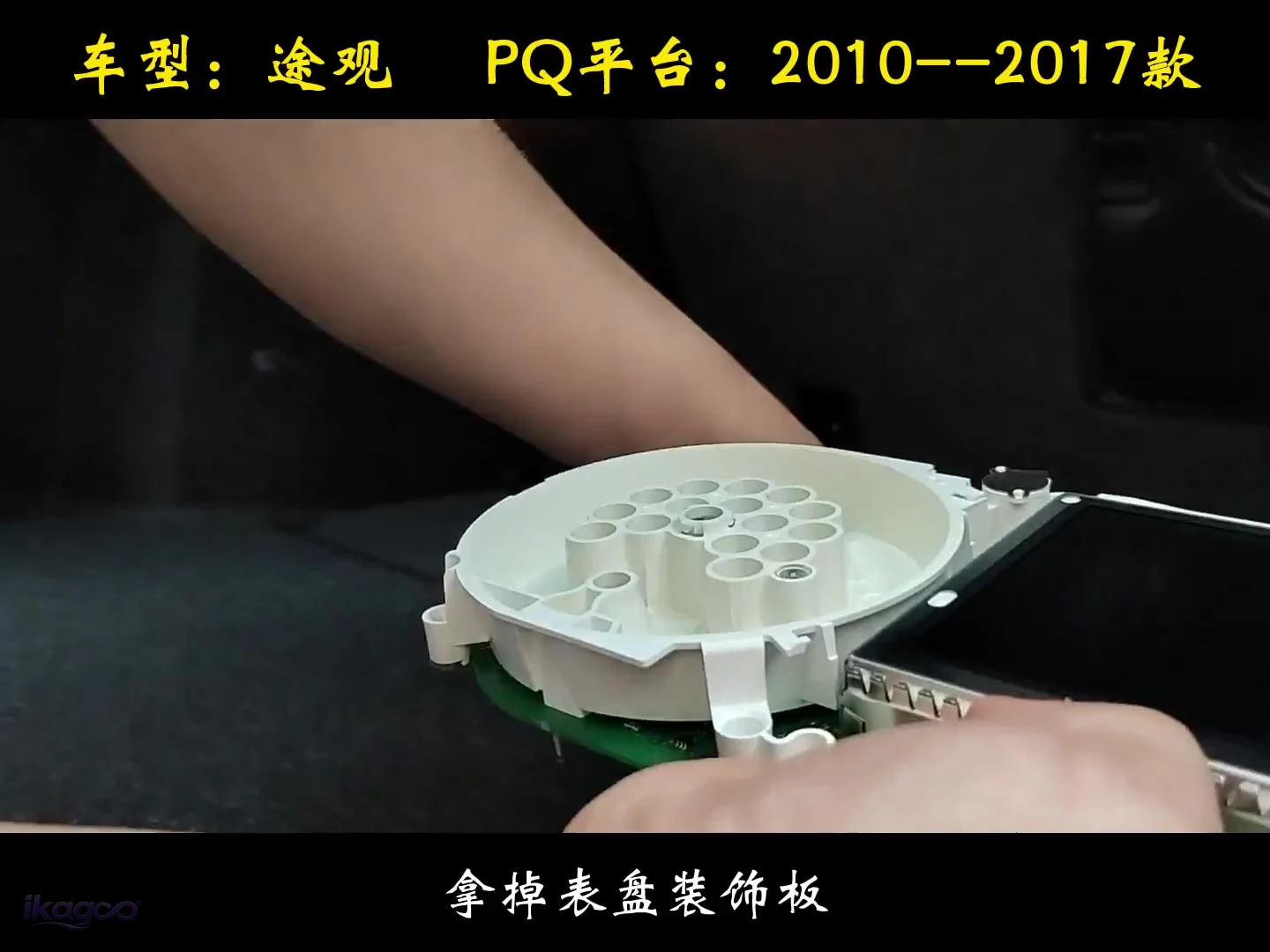 PASO 06
Retire la placa decorativa de la esfera.
Quite la placa frontal original para exponer la placa y la estructura de retención debajo.
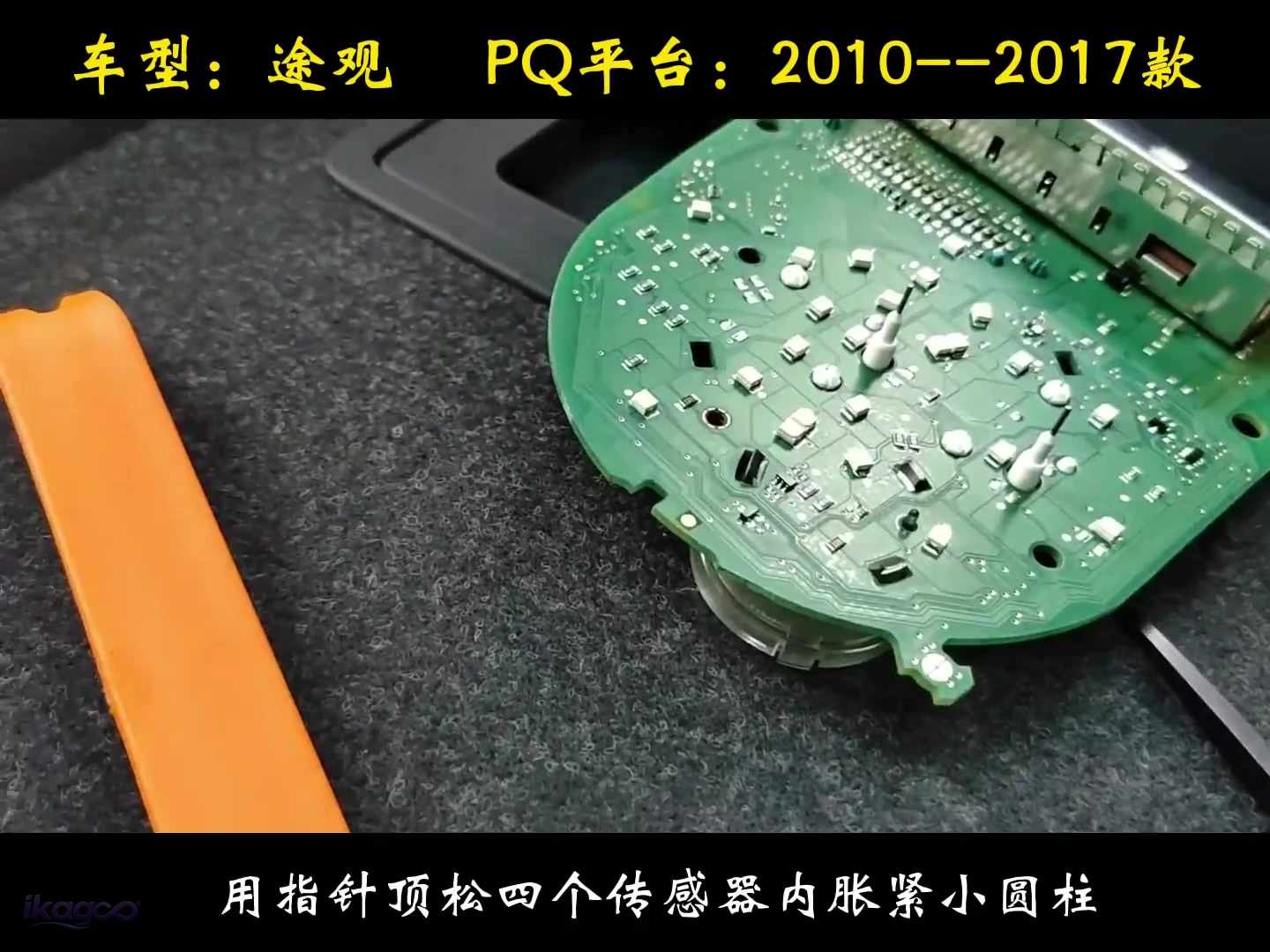 PASO 07
Suelte los cuatro pequeños puntos de retención.
La fuente verificada muestra cuatro pequeños puntos de retención a presión que se liberan en el área del sensor.
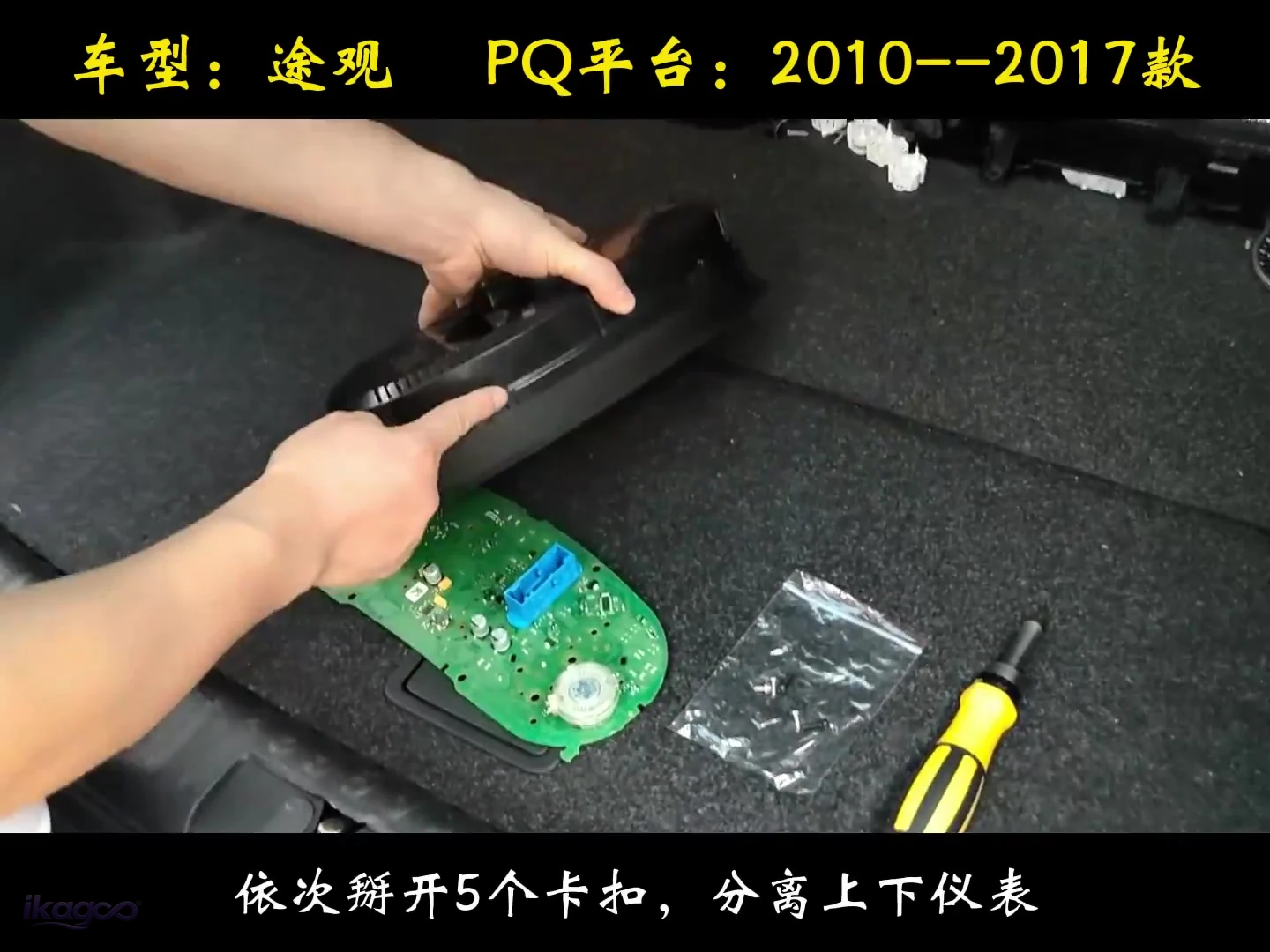 PASO 08
Suelta cinco clips uno por uno
Abre los cinco clips en secuencia, luego separa las secciones superior e inferior del grupo.
Asegura el recorrido interno y cierra la carcasa
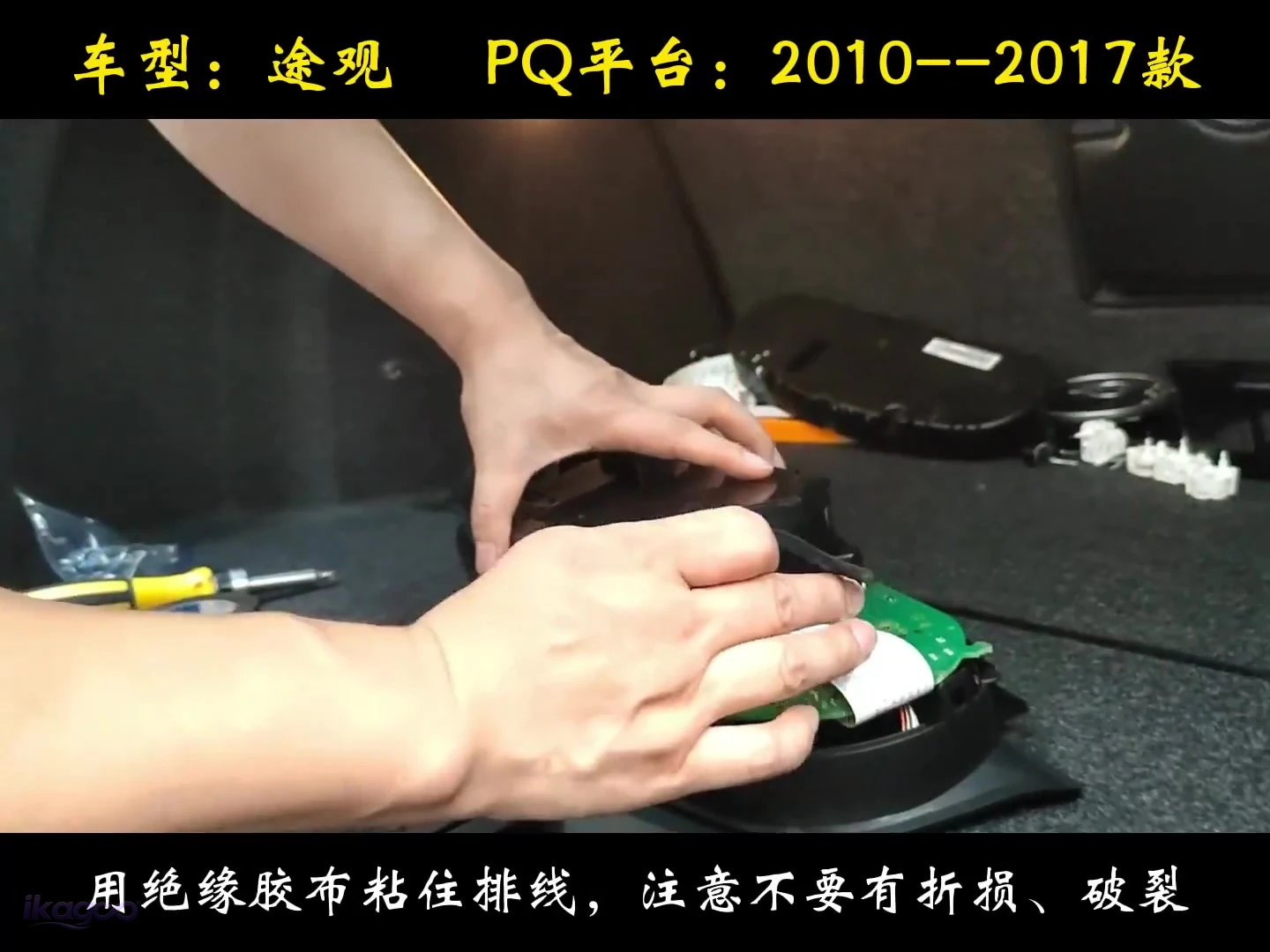 PASO 09
Asegure el cableado interno
Use cinta aislante para fijar el recorrido sin doblar, pellizcar ni dañar el cable.
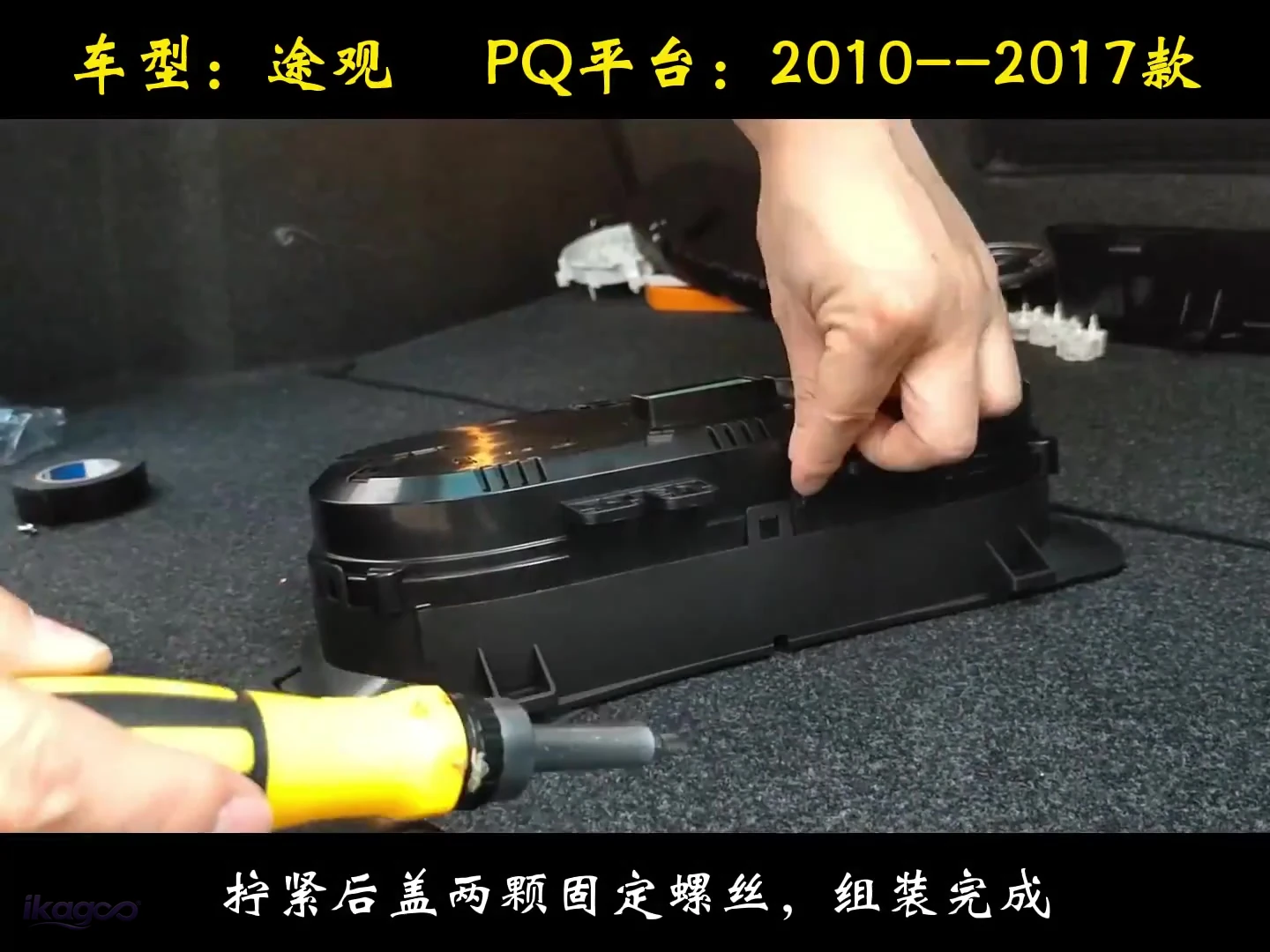 PASO 10
Cierre la tapa trasera
Una vez que el recorrido interno esté asegurado, cierre la carcasa y apriete los dos tornillos de la tapa trasera.
Vuelva a colocar el cuadro de instrumentos en el tablero y pruébelo antes del cierre final.
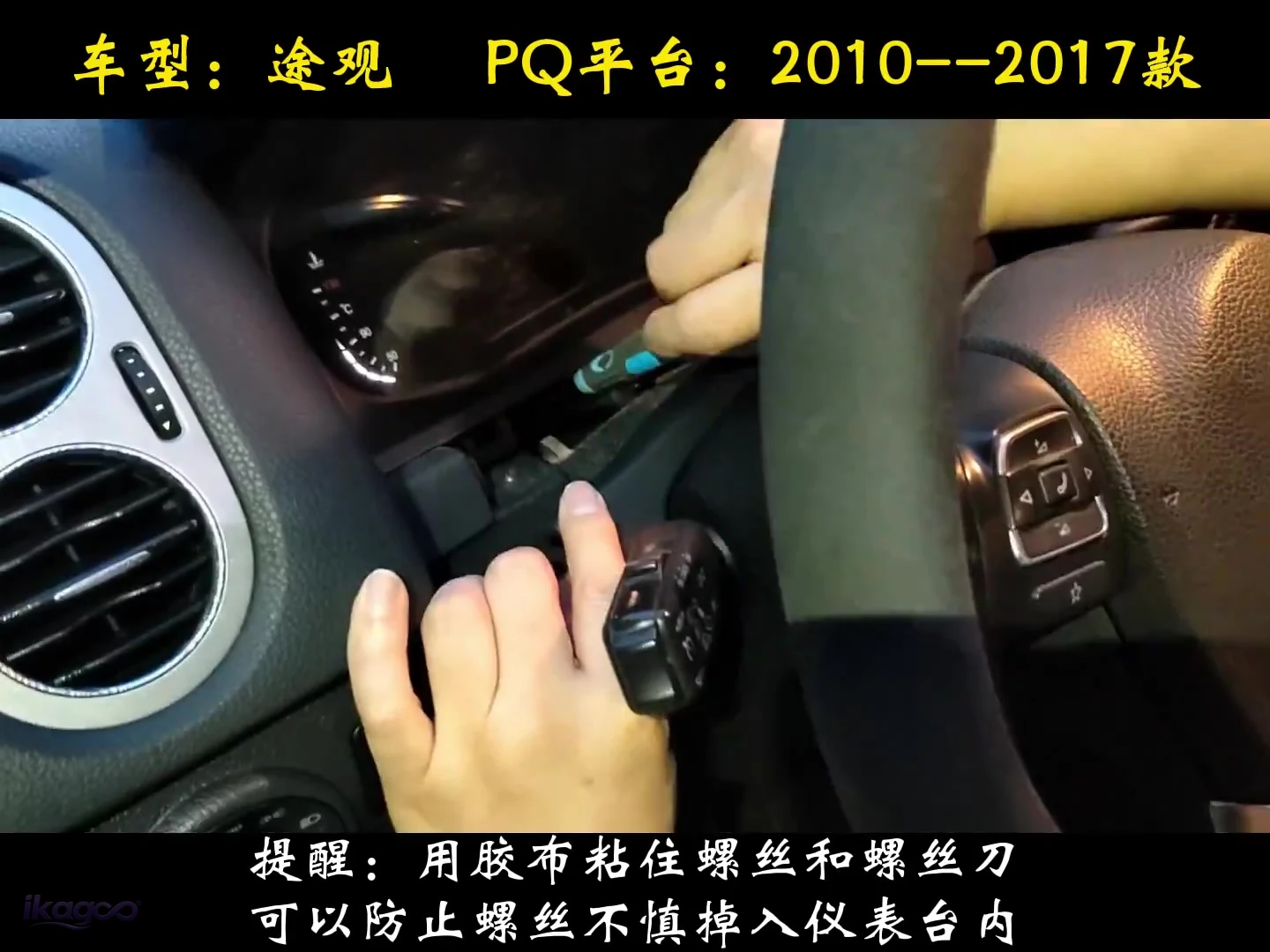 PASO 11
Pegue con cinta el tornillo de fijación al destornillador.
Utilice un trozo pequeño de cinta para mantener el tornillo en el destornillador de modo que no caiga dentro del tablero durante la reinstalación.
Deténgase antes de causar daños si aparece alguna de estas condiciones.
No corte, no vuelva a colocar los pines ni fuerce. Fotografíe el cuadro de instrumentos, el conector y el tablero y utilice la ruta de soporte del pedido.
No cierre la carcasa sobre un cable plano, cable o placa atrapados.
Registre el área de la pantalla y del conector antes de cambiar el cableado o la configuración para que iKAGOO pueda revisar la evidencia.
¿Qué debería funcionar antes de volver a ensamblar completamente el salpicadero?
Una instalación exitosa es más que una pantalla LCD que se enciende. Verifique la información del conductor y la ruta de pantalla suministrada antes de que el embellecedor final vuelva a su lugar. Si iKAGOO luego le pide actualizar una unidad compatible, siga la guía de actualización en línea y por USB del cuadro de instrumentos digital VW/Audi en lugar de cargar un archivo no verificado.
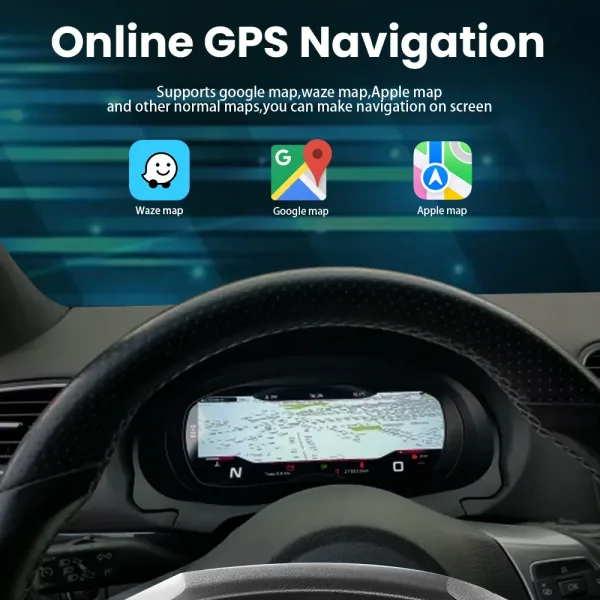

La referencia de la función corresponde después de la instalación, ya que ayuda a verificar el comportamiento final de la pantalla, no los pasos de desmontaje.
¿Vale la pena la actualización del cuadro de instrumentos digital del Tiguan 5N?
Necesidad de actualizar iKAGOO
¿Cuánto valor real de habitáculo añade esta actualización en comparación con mantener el cuadro de instrumentos analógico original?
Ver el estándar de puntuación →Una pantalla IPS de 12.3 pulgadas 1920×720 reemplaza la presentación analógica manteniendo la información admitida de velocidad, RPM, combustible, marcha, kilometraje, temperatura y advertencias en la posición de visión normal del conductor.
El cuadro de instrumentos original ya proporciona información de conducción esencial. Esta actualización mejora la visibilidad, la interfaz y el aspecto del habitáculo; no crea una necesidad básica para operar el vehículo.
Propietarios que quieren un habitáculo claramente más moderno, datos del vehículo en una distribución de pantalla completa e información de teléfono/mapas compatible más cerca del conductor.
Propietarios satisfechos con la pantalla analógica original o compradores cuyo único objetivo es la forma más económica de conservar la información básica de velocidad y advertencias.
Compatibilidad de iKAGOO Original con vehículos
¿Con qué fiabilidad puede el cuadro coincidir con el vehículo Tiguan 5N correcto y conservar la ruta de información original compatible?
Ver el estándar de compatibilidad →La ruta es para vehículos Tiguan Mk1 / Tipo 5N / 5N Facelift seleccionados. Las instalaciones correctamente emparejadas admiten los datos del vehículo, la información de advertencia y el funcionamiento del volante indicados.
El año por sí solo no puede identificar la ruta correcta. La carcasa del cuadro original, la forma del salpicadero, LHD/RHD, el conector/configuración y cualquier modificación previa aún deben coincidir; la fuente verificada del taller comienza en 2010.
Un Tipo 5N 2009–2017 seleccionado con la estructura original compatible de cuadro/salpicadero. Un Tiguan MQB 2017–2022 sigue una ruta diferente y no debe emparejarse desde esta guía.
Puede pedir directamente y luego proporcionar el año del modelo, fotos del cuadro/salpicadero original, la posición de conducción y el historial de modificaciones para que la ruta pueda verificarse de nuevo antes del envío.
Nivel de facilidad de instalación de iKAGOO
¿Qué nivel de habilidad se requiere realmente para completar la conversión física sin dañar el cuadro original?
Ver el estándar L1–L5 →El trabajo requiere desmontar el cuadro, trabajo protegido en banco, extracción de las cuatro agujas, extracción de la placa del dial, liberación de cuatro puntos de retención y cinco clips, enrutado del cableado interno, reensamblaje y prueba de funcionamiento final.
El conjunto del instrumento original debe abrirse y manipularse con cuidado. Un instalador primerizo puede dañar las agujas, los clips, la electrónica expuesta o el cableado interno aunque no se requiera programación del vehículo.
Un propietario DIY experimentado y cómodo con molduras y electrónica de instrumentos, o un instalador de electrónica de automóviles. No se recomienda como primer proyecto de desmontaje de salpicadero.
La carcasa o el conector difieran, un cable no pueda asentarse de forma natural, aparezca una advertencia, o fallen la velocidad/RPM, el combustible, la marcha, el kilometraje, los controles o la ruta del mapa suministrada antes del cierre final de las molduras.
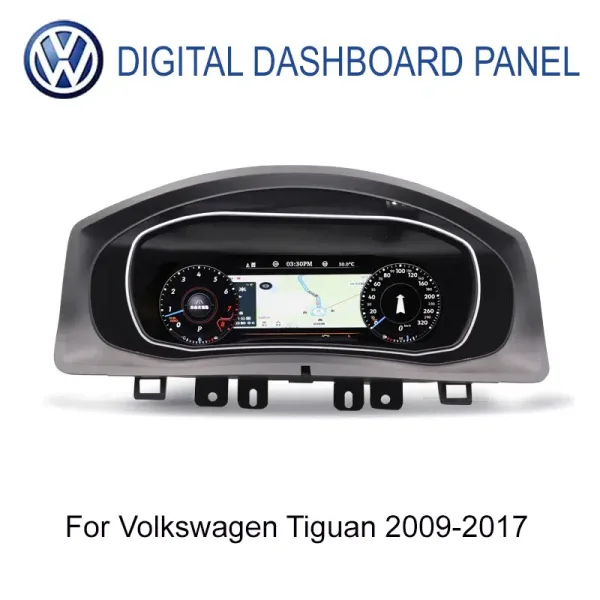
Cuadro Digital VW Tiguan 2009–2017 · Mk1 / Tipo 5N
Esta guía de instalación del cuadro digital VW Tiguan 5N admite la ruta específica iKAGOO Tiguan de 12.3 pulgadas IPS 1920×720 con datos de conducción de fábrica compatibles, integración con el volante y visualización de CarPlay / Android Auto / mapas en línea a través del controlador emparejado o la ruta de sincronización.
¿Qué ocurre después de realizar el pedido?
Antes del envío, iKAGOO revisa la información del vehículo/versión necesaria para preparar la ruta correcta y solicita fotos adicionales solo si es necesario.
La mayoría de los pedidos en stock se procesan en 1–3 días hábiles una vez que el pago y la información requerida del vehículo están disponibles. La entrega internacional estimada es generalmente de 7–15 días hábiles tras el envío, según el destino y la ruta.
Política de envíos →Las fotos/vídeos, las comprobaciones de conectores y la evidencia de instalación se pueden revisar cuando algo no esté claro. Las fallas de hardware elegibles están cubiertas por la garantía limitada actual de 12 meses.
Política de garantía →Preguntas que los compradores hacen antes de pedir el cuadro digital VW Tiguan 5N
¿Esto encajará en mi VW Tiguan 2014?
Sí, en la mayoría de las configuraciones Mk1 / Tipo 5N correctamente emparejadas. La forma original del cuadro y del salpicadero todavía se comprueba para que se pueda preparar la ruta correcta antes del envío.
¿Este cuadro de Tiguan requiere programación?
No se requiere programación del vehículo para esta ruta iKAGOO. El trabajo verificado es la extracción física del cuadro, la transferencia/remontaje interno y la prueba de funcionamiento final.
¿Seguirán funcionando la velocidad, las RPM, el combustible, el kilometraje y las advertencias?
Sí, en la ruta correcta. Los datos de conducción de fábrica compatibles siguen formando parte de la pantalla del instrumento digital.
¿Seguirán funcionando los mandos del volante?
Sí, cuando la ruta de control 5N compatible se empareja correctamente. Verifíquelos durante la prueba de funcionamiento final antes de cerrar el salpicadero.
¿Pueden aparecer los mapas de CarPlay o Android Auto en el cuadro?
Sí, a través de la ruta de controlador/sincronización compatible. El cuadro muestra información de proyección del teléfono o de mapas en lugar de actuar como una unidad principal Android independiente.
¿Tengo que cortar el cableado de fábrica?
La ruta compatible está diseñada para evitar el corte intencionado del mazo de cables de fábrica. Si el conector no coincide, deténgase y verifique la versión en lugar de modificar los pines a ciegas.
¿Puedo pedir sin contactar primero con iKAGOO?
Sí. Puede pedir directamente. La revisión previa a la venta es opcional; la ruta del vehículo/versión se comprueba de nuevo antes del envío.
¿Qué información puede solicitar iKAGOO antes del envío?
Año del modelo, fotos del cuadro/salpicadero originales, LHD/RHD y detalles del conector o de la configuración cuando sea necesario para preparar la ruta correcta.
¿Puedo instalarlo yo mismo?
Es posible el bricolaje con experiencia. Esta es una ruta L3 porque el cuadro original se abre en el banco de trabajo. Un instalador de electrónica del automóvil es más seguro para usuarios primerizos.
¿Qué pasa si algo no funciona después de la instalación?
Deténgase antes de hacer cambios irreversibles. Envíe el número de pedido junto con fotos/vídeos claros de la pantalla, la zona del conector y el comportamiento observado para que se puedan revisar la instalación, la configuración y la ruta del hardware.
¿Cuánto tarda el envío?
El procesamiento y la entrega son independientes. La mayoría de los pedidos en stock se procesan en 1–3 días hábiles después de que el pago y la información requerida estén disponibles; la entrega internacional es generalmente de 7–15 días hábiles después del envío.
¿Qué garantía ofrece iKAGOO?
El hardware elegible está cubierto durante 12 meses desde la entrega confirmada bajo la garantía limitada de hardware actual y sus condiciones establecidas.
Utiliza esta guía de instalación del cuadro digital del VW Tiguan 5N para pedir la ruta correcta, no solo una pantalla que lo parezca
Realiza el pedido directamente cuando tu Tiguan siga la ruta Mk1 / Type 5N indicada. Usa la revisión opcional previa a la venta si quieres ayuda primero; iKAGOO vuelve a verificar la información del vehículo/versión antes del envío.










Add comment
Lo siento, debes estar conectado para publicar un comentario.